

What Can an AI Agent Actually Do for Your Business? Real Use Cases, Costs, and What to Automate First
- Published —
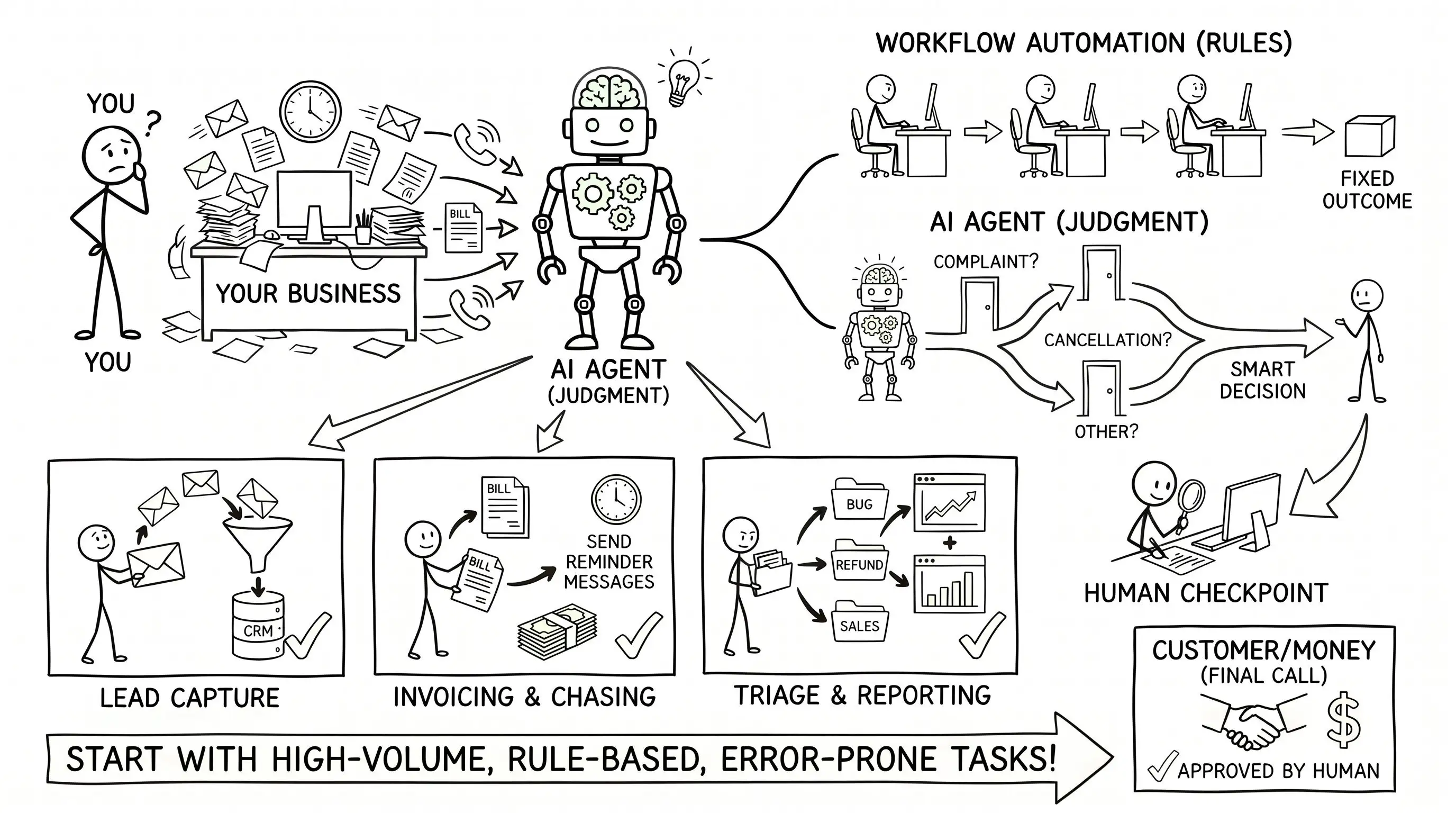
An AI agent is software that makes a judgment call instead of following a fixed rule: it reads a messy request, decides which of your systems it touches, and acts. For most small businesses the honest answer is narrow. Agents earn their keep on high-volume, rule-heavy, error-prone work like lead capture, invoicing, and triage, and stay overkill for the rest. Wherever a decision touches money or a customer, keep a human in the loop.
Search AI agents for business and every result is a list of the ten best AI agents, and by an odd coincidence each list ranks the vendor that published it first. Under the ranking sits a plain question none of them answers with a subscription attached: can one of these things do real work in a small company, and where would you point it?
An AI agent is not a chatbot with a wider vocabulary. It is software that takes a goal, works out the steps, and acts across your tools with some judgment on the way. The capability is real. It is also narrower in practice than the marketing implies. The useful question is never whether agents are clever; it is which of your daily headaches is repetitive and rule-bound enough to hand to one. What follows is the version with nothing to sell.
What can an AI agent actually do for your business?
The honest list is shorter and duller than the demos, which is exactly why it pays off. Agents do their best work on tasks nobody enjoys and everybody gets slightly wrong under pressure.
- Lead capture and follow-up: the agent watches your inbox and forms, pulls out the name, company, and intent, writes it to your CRM, and drafts a first reply while the lead is still warm.
- Invoicing and chasing payment: it raises the invoice from a finished job, sends it, and nudges the ones that go quiet, so nothing sits unpaid for three weeks because everyone assumed someone else had it.
- Support triage: it reads an incoming message, works out whether it is a refund, a bug, or a sales question, tags it, and routes it to the right person with a draft answer attached.
- Weekly reporting: it pulls the numbers you assemble by hand every Monday from three dashboards and writes the summary in the format you already use.
- Moving data between systems: the unglamorous copying of a record from a form to a CRM to an accounting tool, which is precisely where quiet, expensive mistakes breed.
It helps as much to name what they are bad at. Agents are unreliable where a confident mistake is costly and the rules are fuzzy: pricing a bespoke quote, making a final hiring call, approving a refund that breaks policy. Point one at those and you have not saved time, you have added a plausible-sounding source of errors.
See the pattern in the wins. Not one of them is a moonshot. Each is high in volume, clear in its rules, and costly when it slips. That combination, not the raw intelligence of the model, is what makes a job worth handing over.
Do you need an AI agent, or just workflow automation?
Most of what gets sold as an AI agent is really workflow automation, and that is good news, because workflow automation is cheaper, steadier, and easier to trust. The distinction is worth holding onto.
- Workflow automation follows rules. When a form is submitted, create the record, send the email, update the sheet. The path is fixed, and it does the same thing every time, which is exactly what you want for anything touching money or compliance.
- An AI agent applies judgment. It handles the cases a rule cannot fully spell out: an email that could be a complaint or a cancellation, an invoice with a line item that does not match the order, a message in a language your form did not expect.
The practical rule: reach for automation when the steps are knowable in advance, and add an agent only where the input is messy enough to need judgment, not just rules. Get this wrong in the expensive direction and you pay a model to make a call a simple rule already handles perfectly, every time, for free.
Plenty of the highest-value projects are mostly deterministic plumbing with a small, well-fenced patch of AI where it earns its place. A marketplace is a clean example: listings, matching, and notifications run on rules, while sorting an ambiguous buyer request needs judgment. That mix is roughly the shape of the automation work behind a build like Rootie.
Why the term suddenly got loud
You can watch the category being renamed in real time. According to Google keyword trend data from 2026, search interest in the older language is falling off a cliff: business process automation is down roughly 62% year over year and robotic process automation around 56%. Over the same stretch, and in the same data, ai automation agency climbed about 132% to roughly 3,600 searches a month, while ai agents for business rose 22%. The work did not vanish. It got a new name and a fresh coat of ambition.
Adoption is real but earlier than the headlines imply. McKinsey’s State of AI in 2025 found 23% of organizations actively scaling an agentic AI system in at least one business function, with another 39% experimenting. In any single function, though, no more than about 10% report scaling agents, according to the same report. Most companies are running one or two of these, not rebuilding the business around them.
For a smaller company the gap is the opening. About 20% of EU enterprises used AI in 2025, up around 6.5 percentage points on the year, according to Eurostat, but only about 17% of small enterprises did, against roughly 55% of large ones. The capability that used to be a big-company advantage is now a monthly subscription. The businesses moving early are quietly closing a gap their larger rivals spent millions to open.
How much does an AI agent cost?
Nobody can quote you a price from the name of the task, because cost does not track the task. It tracks the plumbing. Two things drive the bill.
- How many systems the process touches. Reading an email and drafting a reply is cheap. Reading an email, checking stock in one system, updating a CRM, raising an invoice in another, and notifying a person is five integrations, each with its own login, quirks, and failure modes. The price follows the connections, not how clever the agent sounds.
- How many exceptions the process hides. The demo handles the clean case. Real work is edge cases: the refund outside policy, the duplicate order, the customer who replies to a five-year-old thread. Every exception you want handled well is more design, more testing, and more careful fencing so the agent does not confidently do the wrong thing.
In rough terms, the same-sounding request can be a weekend of work or a full quarter, and the deciding factor is almost never the AI. It is the number of systems and the mess between them. There are running costs on top: model usage is metered, and a chatty agent left unwatched can quietly stack up a bill. None of this makes agents expensive by default. It makes them impossible to price sight-unseen. A tightly scoped automation that touches two systems and handles three exceptions is closer to a small software build than an enterprise platform, which is one reason a lean, prototype-first approach tends to beat a grand rollout: you learn what the process actually does before you pour money into automating it.
What should a small business automate first?
Rank the candidates by one test: high-volume, rule-based, error-prone. The task you do many times, the same way each time, and quietly pay for when it goes wrong. That is where automation returns the most for the least risk. Notice that glamour is the wrong signal here; the dull jobs pay back fastest.
A workable order for most small businesses:
- Start with intake. Lead capture, contact forms, first-response triage. High volume, clear rules, and every dropped lead carries a price tag.
- Then the money admin. Invoicing, payment reminders, reconciliation. Repetitive, rule-heavy, and unforgiving of small mistakes.
- Then reporting. The weekly numbers you assemble by hand. Pure time saved at near-zero risk, because a wrong figure is caught before it does harm.
- Only then the judgment calls. Support answers, lead qualification, anything customer-facing. Automate the retrieval and the draft; keep a person on the send button.
One rule sits above the list. Put a human checkpoint anywhere a decision touches money or a customer. An agent that drafts an invoice is a time-saver; an agent that sends money without review is a liability. The point of automating the boring layer is to free your people for the calls a machine should not make alone.
Where to start
You do not need an agent strategy. You need one boring, expensive process picked off cleanly, running for a month, and quietly saving hours before you touch the next one. Almost every business has three or four of those hiding in plain sight — the hard part is choosing the first, not building it.
That first choice is most of the value, and it is the part worth a second opinion. It is the core of how we approach AI and automation: find the process that pays back fastest, fence the AI to where it genuinely helps, and keep a person wherever it counts. If you would rather talk it through than read another vendor list, tell us what eats your week.