
How Much Does a Web Accessibility Audit Cost in 2026 — and What Must It Cover Now the EAA Is in Force?
- Published —
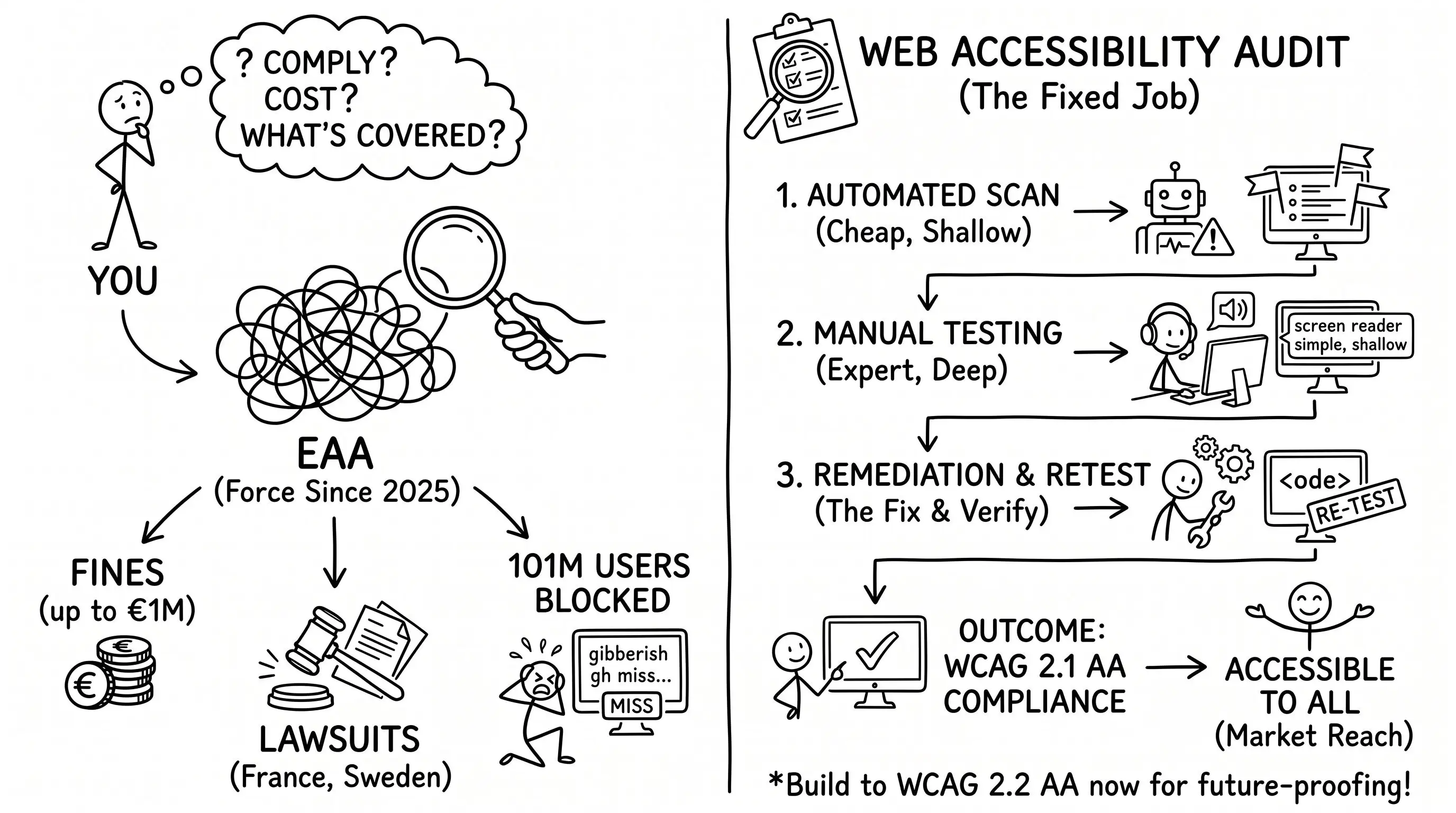
A web accessibility audit has no fixed price, but it now has a fixed job: prove your site meets WCAG 2.1 AA, the standard the European Accessibility Act made mandatory in June 2025. What you pay depends on how large and complex your site is, and whether you want the audit to fix what it finds or simply tell you.
A year ago, the honest question was whether the European Accessibility Act had teeth. It does. The Act has applied since 28 June 2025 to websites, mobile apps, and online shops sold to consumers anywhere in the EU, and enforcement is already on the record: Sweden’s telecoms regulator had fielded 124 consumer complaints within months of the deadline, and the first EAA lawsuits were filed in France in November 2025, according to enforcement reporting compiled in 2026.
The buyer’s question moved with it. Last year people asked whether accessibility mattered; now they ask what an audit costs and what a competent one covers. Search that today and page one still answers a different country’s law: US vendor pages built around the ADA, plus a W3C explainer last updated in 2023. Here is the version for a business selling into the EU, in the Act’s second year.
Does your website have to comply with the EAA?
Probably, yes. The Act reaches any business selling goods or services to EU consumers through a digital channel: e-commerce checkouts, banking apps, ticketing, e-books, and the sites behind them. It applies no matter where the company is based, which is why plenty of UK, US, and Swiss firms are in scope without knowing it.
There is one real carve-out. The Act’s microenterprise exemption covers service providers with fewer than 10 employees and under €2 million in annual turnover. Most companies running a serious online storefront sit above that line, and the exemption is narrower than it reads: it does not shield manufacturers, and each member state transposed the Act with its own thresholds and penalties. Published national caps for 2026 run from tens of thousands of euros into seven figures. Germany fines up to €100,000 per violation; Spain reaches €1,000,000 for the most serious cases, according to national enforcement summaries in 2026. So far the pattern has been pressure rather than punishment: regulators are leaning on complaints, formal notices, and correction deadlines more than headline fines. That grace narrows with every quarter of the Act’s second year.
The commercial case usually outweighs the fines anyway. Around 101 million adults in the EU, roughly one in four over the age of 16, live with some form of disability, according to Eurostat (2025). For most products that is the largest single group of users nobody designed for.
What a web accessibility audit actually costs
Ask five agencies and you will get five different numbers, all defensible. That is not evasion; it is the nature of the work. An audit is priced by effort, and the effort is set by how much of your site a specialist has to test by hand against a defined standard. Any firm that quotes a flat fee before seeing your product is guessing.
You can read the shape of the market in what people pay to reach it. The phrase accessibility audit draws commercial search, not students reading up on the topic: a cost-per-click around $35 and volume up about 14% year over year, according to search-demand data in 2026. Those are buyers with a budget already approved.
The cheapest option is close to free and worth roughly what it costs. Automated scanners like Axe, WAVE, and Lighthouse flag missing alt text and weak colour contrast in seconds, but they reach only a fraction of the WCAG success criteria. The judgement-heavy failures, the ones that actually lock people out, need a human with a keyboard and a screen reader. That expert time is what you pay for, and it is why two audits of the same-sized site can differ several times over.
What moves the price up or down
Six factors do most of the work in any quote:
- Site size, counted in templates: What matters is the number of distinct page types and components, not the total page count. A 500-page site built from eight templates is a smaller job than a 40-page site where every page is bespoke.
- Manual depth: Automated-only scans are cheap and shallow. Full manual testing with assistive technology costs more because it takes expert days, and it is the only way to certify real compliance.
- Audit only, or audit plus remediation: Finding the problems is the smaller number; fixing them is the larger one. Remediation usually costs more than the audit, especially on older codebases.
- The standard you test against: WCAG 2.1 AA is the legal floor. Testing to 2.2 AA, or adding a formal accessibility statement, extends the scope and the cost.
- Content types beyond HTML: PDFs, video captions, third-party widgets, and embedded booking or payment tools each need their own checks. A checkout flow with several third-party components is where cost and legal risk concentrate.
- Re-testing: A credible engagement includes a retest after fixes to confirm the issues are closed. A one-and-done scan that never verifies the repair is not an audit; it is a screenshot.
What a proper audit includes
A real audit produces a decision, not a dashboard. Stripped down, a competent one covers four things:
- Automated and manual testing together. The scanner handles the mechanical checks; a specialist works through every template with a keyboard, a screen reader, and zoom, the way disabled users actually navigate.
- Every WCAG 2.1 AA success criterion. Each issue is mapped to the specific rule it fails, so the report is defensible rather than a matter of opinion.
- A prioritised, plain-language report. Findings ranked by user impact and legal exposure, each paired with the fix, written so your developers can act without a translator.
- A path to done. Remediation guidance and a retest, plus the accessibility statement the Act expects you to publish.
If a proposal skips manual testing or hands you a raw scanner export with a hundred undifferentiated “errors”, it is selling a tool run, not an audit. The same clean, semantic markup that makes a site pass these checks also makes it legible to the machines that read it for other reasons, which is why accessibility and AI search visibility tend to improve together.
What is WCAG 2.2, and do you need it?
WCAG stands for the Web Content Accessibility Guidelines, the technical standard the whole system rests on. The EAA does not name a version in its own text; compliance is defined through the European standard EN 301 549, which currently points to WCAG 2.1 AA as the baseline. That is what you are legally measured against today.
WCAG 2.2, published by the W3C, is the newer version. It keeps everything in 2.1 and adds nine success criteria, most aimed at people with motor and cognitive disabilities: larger click targets, visible keyboard focus, less reliance on dragging and memory. Interest has climbed sharply, with worldwide search for the term running about seven times its mid-2025 level, according to search-demand data in 2026.
Do you need it? Legally, not yet. Practically, build to 2.2 AA now. The extra criteria are cheap to satisfy during design and expensive to retrofit, EN 301 549 is expected to move to 2.2 in a future revision, and the newer guidelines simply make for a better product. Testing to the floor and no further is how you end up auditing twice.
Where to start
Start by learning where you actually stand, because most teams have never tested. Run a free scanner across your top templates for a first signal, then have one flow that matters — a signup, a checkout, a contact form — audited properly by hand. That single deep pass tells you more than a hundred automated warnings, and you will know within a day whether you have a small tidy-up or a real project on your hands.
At Opulon we build to WCAG 2.1 AA by default, so accessibility lives inside the design and UX work rather than arriving later as a separate bill. If you would rather have a person walk your site than a scanner, talk to us.