

Is Canva Worth It for a Business in 2027? What a Year Costs, and What Its Licence Won't Let You Own
- Published —
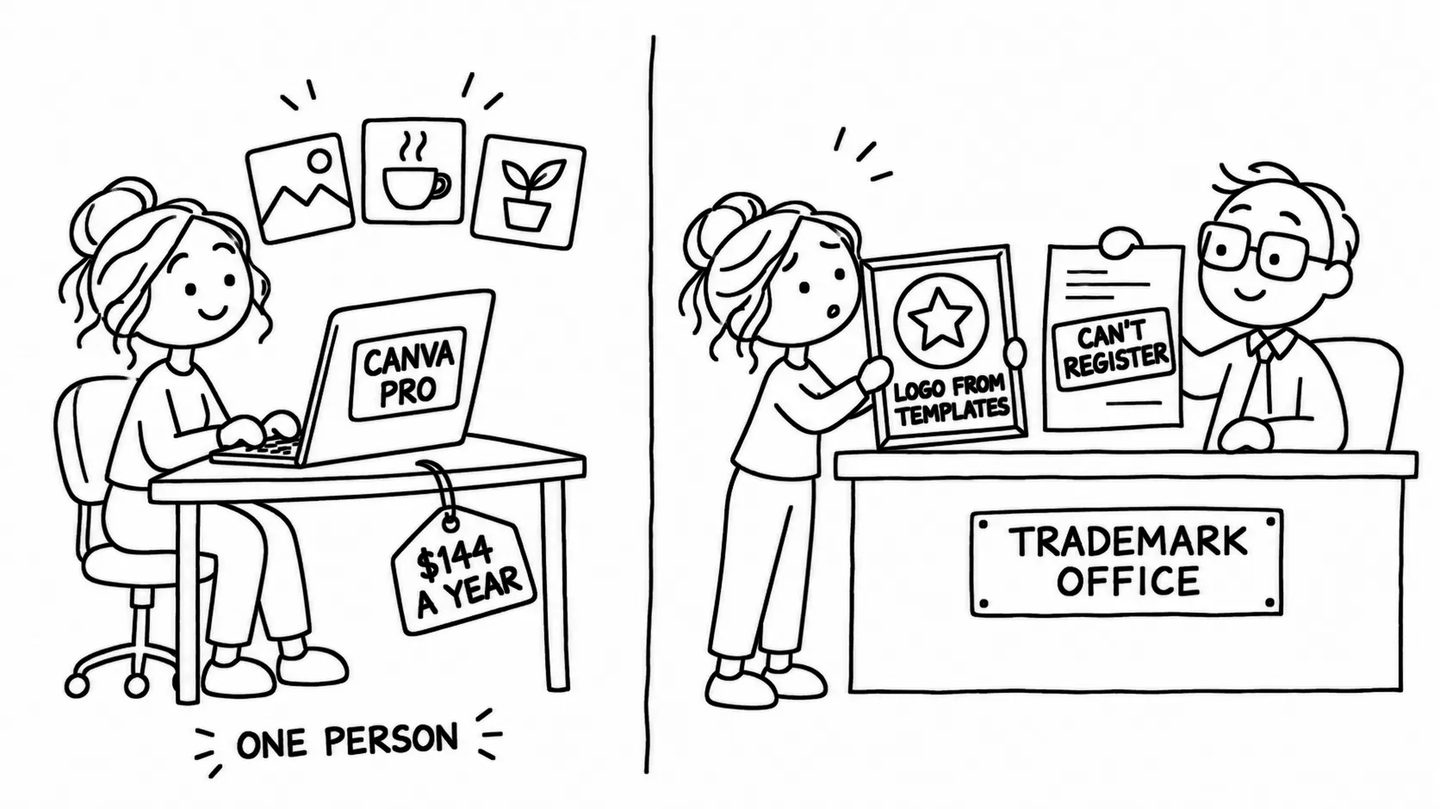
Short answer: for one person who makes social posts, flyers or slides every week, yes. Canva Pro costs $144 a year in the US and €110 in Europe, and Canva Free already covers occasional work. A team pays per person on Canva Business, $250 a year each, and inviting a colleague into a Pro account switches it to that plan. No plan gives you a logo you can register as a trademark if it is built from Canva's templates or stock elements; only its fonts and simple shapes are free of that limit.
A business that stops paying for Canva Pro keeps every design it made. The premium photos, graphics and templates inside those designs stay too, under a watermark, until it subscribes again (Canva Help Center) or buys a licence for each element, which then covers “unlimited edits and downloads only in the same design you purchased it for” (Canva Help Center). Canva sells a design tool and rents a content library on top of it, and its licence for that library decides what a business may sell, hand to a client or register as a trademark.
Canva counted 260 million people using it every month and $3.5 billion in revenue at the end of 2025 (Canva, 15 December 2025), and over 28 million paying customers a few weeks earlier (Canva, 4 November 2025). On 30 October 2025 it closed its Teams plan to new customers, replaced it with Canva Business (Canva, 2025) and made Affinity, its professional design software, free.
How much does Canva cost in 2026?
Canva sells four plans. The US prices below come from its pricing page and its plan comparison, the euro prices from the Slovak version of the pricing page, all read on 20 November 2026:
| Plan | US, billed yearly | US, billed monthly | Euro area, yearly | Euro area, monthly | What it adds |
|---|---|---|---|---|---|
| Free | $0 | $0 | 0 € | 0 € | 5 GB storage, 1 Brand Kit with 3 colours, up to 20 AI uses a month |
| Pro | $144, one person | $18 | €110 | €12 | premium library, 5 Brand Kits, 100 GB, 10x the AI of Free |
| Business | $250 per person | $25 per person | €170 per person | €17 per person | 100 Brand Kits, approvals, team admin, 20x the AI of Free |
| Enterprise | custom | custom | custom | custom | governance and security for 100 or more employees, AI indemnity from 100 seats |
US prices “exclude applicable tax”. Canva’s terms say fees “are inclusive of all taxes unless otherwise specified” (Terms of Use, effective 16 November 2026), and a business in the EU that gives a valid VAT number gets an invoice without VAT under the reverse charge, at the same listed price (Canva Help Center). At the European Central Bank’s reference rate of $1.0992 on 19 November 2026, Pro costs a European buyer about $121 a year and Business about $187 per person. The same terms forbid using “a virtual private network (VPN) to circumvent geographic-based pricing”.
Pro Lite, “a plan between Free and Pro” with the premium library and the same AI allowance as Free, is sold only in India, Indonesia and nine Latin American countries (Canva Help Center). AI Pass is an add-on at “USD $100 globally per person, per month” for heavy users of Canva’s AI tools (Canva Help Center).
A new account can try Pro or Business once per account and once per payment method; a trial started without payment details “ends automatically and you won’t be charged” (Canva Help Center). Canva’s plan comparison gives the trial as 30 days. Paid plans renew automatically, and fees already paid are not refunded “except where required by law”.
Why is Canva charging me $30 a month?
A charge of $30 a month matches Canva Teams, the plan Canva stopped selling in October 2025. In 2024 Teams cost “US$10/month per person starting at three people” (Canva, 10 October 2024), which puts the smallest team at $30 a month, and existing subscribers “keep your current pricing, including when you add new members” (Canva Help Center).
A bill that rises after an invitation has a different cause. “Inviting someone to your team while on Canva Pro will change your plan to Canva Business,” Canva’s billing help says (Canva Help Center). Canva’s own pages disagree on when the new seat is billed: the pricing FAQ says you are charged “straight away, even if the person joins later”, and the terms add a seat when an invitation is sent “whether or not the invitation has been accepted”, while its small-business page says you only pay for those who accept.
How often does Canva change its prices?
In the US, the yearly price of Pro rose by a fifth in 2026. It was $119.99 in 2023 and $120 until at least November 2025 (Wayback Machine copy of the pricing page), and $144 by May 2026, while the monthly price went from $12.99 in mid-2023 to $18. Business launched at an introductory $200 a year per person. In euros, Pro cost €110 a year in captures from November 2025 to January 2026, as it does today.
In September 2024 owners of older Teams accounts found their renewals rising from $119.99 a year for up to five people to $500, with 40% off the first year, according to The Verge and TechCrunch on 3 September. Canva had already switched new Teams customers to $10 a month per person with a three-person minimum in April. In October Canva withdrew the price increase for existing teams, “pleased to maintain their original pricing for their current team,” and promised “at least 60 days’ notice of any price changes” (Canva, 10 October 2024).
On 3 November 2026 Canva announced that “1,271 people, or 22% of Canva” would lose their jobs, saying that “our growth has slowed for the first time in a decade” (Canva, 2026).
What does a year of Canva cost a small team?
Take a business where one person makes the social posts, the price lists and the occasional flyer, and the owner signs off on them:
| Team | Plan | Per year (US) | Per year (euro area) |
|---|---|---|---|
| 1 person | Pro | $144 | €110 |
| 3 people | Business | $750 | €510 |
| 5 people | Business | $1,250 | €850 |
| 3 people, each on their own Pro | Pro × 3 | $432 | €330 |
The five-person team pays $1,500 a year in the US if it pays monthly. The last row is cheaper and allowed, since each person needs “a unique account” anyway. The Business price includes shared Brand Kits and folders, design approvals and control over members’ designs. On a team, the owner or an administrator “may control access to, delete, or re-assign ownership to” the designs a member creates (Terms of Use, section 8), and can transfer a person’s designs before removing them (Canva Help Center). On three separate Pro accounts, each person’s designs sit in that person’s account, including after they leave the business.
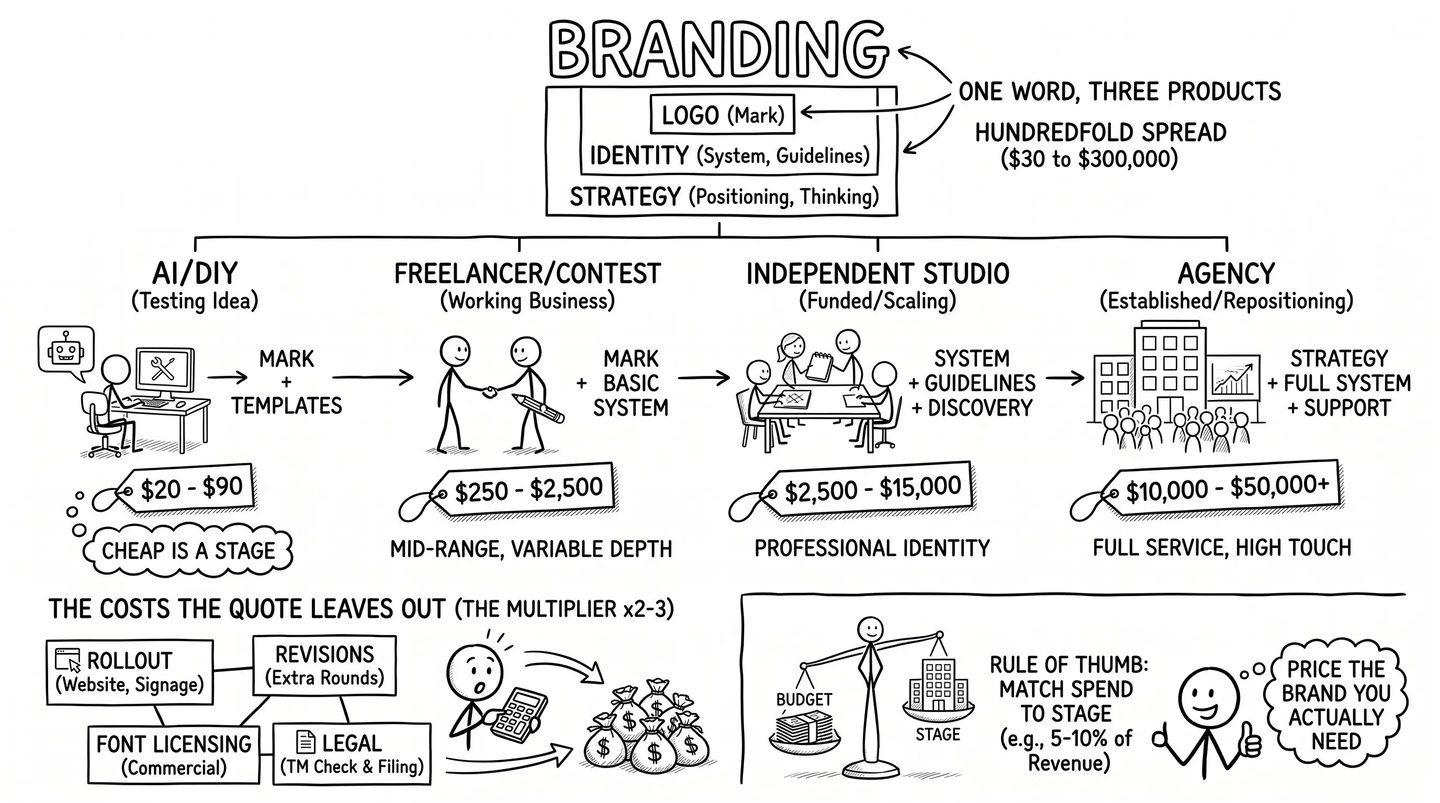
Against these figures, design work bought from a person is priced per job. A logo and a small identity from a freelancer or a studio cost from a few hundred to several thousand dollars, the ranges in our breakdown of what branding costs. Canva replaces the routine production work, and the identity work stays with the designer.
Is Canva free for commercial use?
Yes, on every plan, within the Content License Agreement. Designs you make are yours: “As between you and Canva, you own all right, title and interest in and to your User Content,” and the terms’ plain-language summary says “We never own your designs”. The photos, graphics, videos and templates from Canva’s library stay licensed to you, and the licence sets the limits a business runs into:
- Selling the content itself: you may not “sub-license, re-sell, rent, lend… or otherwise transfer or distribute the Content” (section 9.1), and Pro content may appear in templates you sell only “if they’re shared as Canva template links”, never as a PDF or another file (Canva Help Center).
- Merchandise: “You can’t take an element from the Canva library… put it on a t-shirt, and sell it.” Print-on-demand is allowed for your own original design.
- Client work: a design with Free or Pro content may be transferred to a client under a written agreement, and “can only be transferred to a single client” (section 4A).
- Reuse: a Pro element bought as a single licence covers one design; using it in another one, a resized copy included, needs a new licence (section 4).
Can you trademark a logo made in Canva?
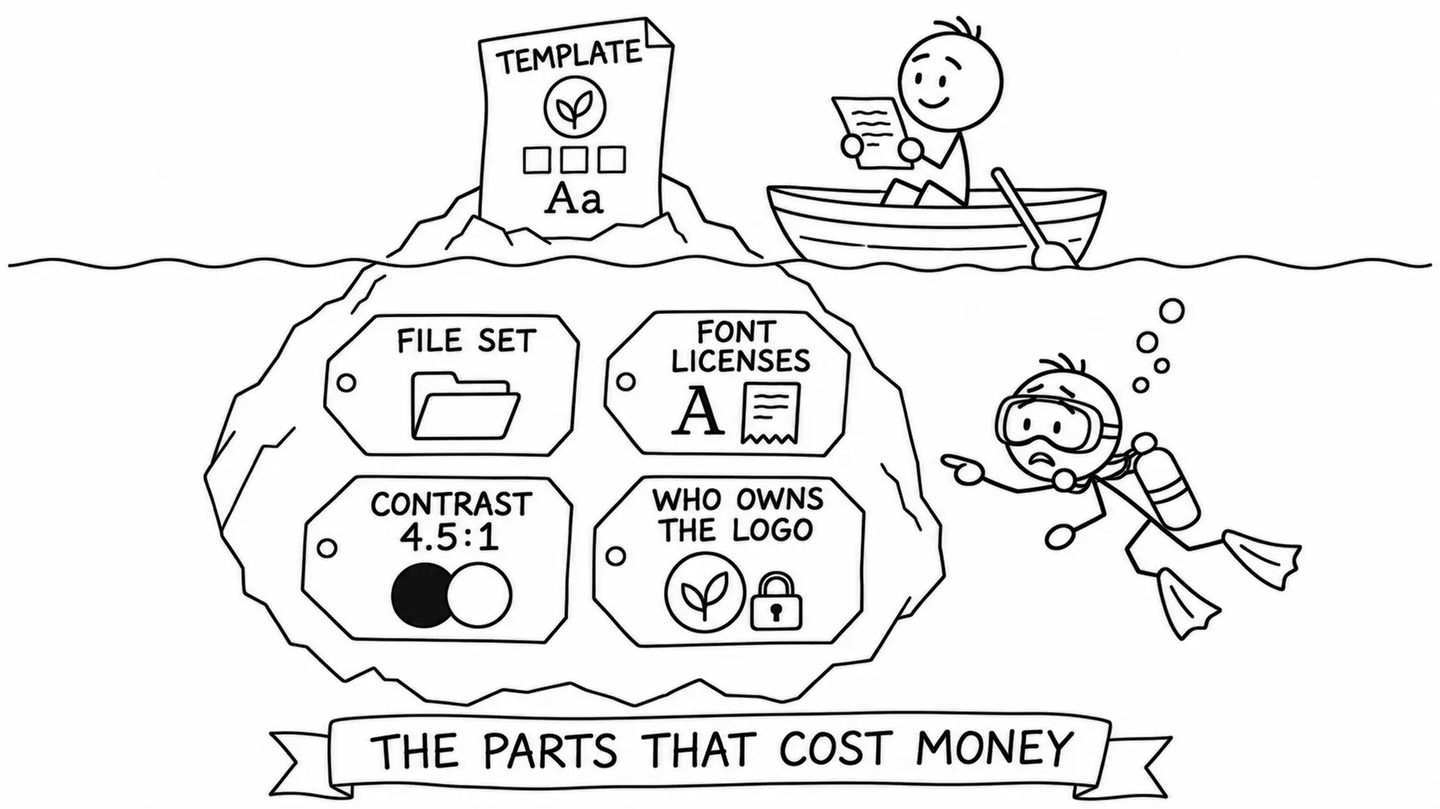
Not if it uses Canva’s stock content or one of its logo templates. The licence forbids using its content “as part of a trade-mark, design-mark, trade-name, business name or service mark (excluding fonts)” (section 9.2), and Canva’s help page on logos gives the reason: “Other Canva users are free to use the same content which means that using stock content for your logos isn’t suitable for use in a trademark. Elements in a logo need to be exclusive to you.” The same page allows “simple lines and shapes from our Free library” and all of Canva’s fonts, and says a logo made from one of its templates is non-exclusive: “you can’t register it as a trademark” (Canva Help Center).
The simple shapes that remain are what trademark offices protect least. The EUIPO’s Board of Appeal held in July 2025 that “simple geometric shapes are devoid of distinctive character” (EUIPO, case R 370/2025-5), and the USPTO treats a design element that many others use as “relatively weak and entitled to only a narrow scope of protection” (TMEP § 1207.01(d)(iii)). In a logo made in Canva, the part most likely to be registrable is the name itself, which can be filed as a word mark whatever font it is set in, after a check against existing marks. A logo drawn with AI raises the separate question of who owns it, which our comparison of AI image generators covers.
What happens to your designs if you stop paying?
You keep paid features until the end of the billing period, and then “all designs remain accessible on Canva Free” (Canva Help Center). For a team, “all designs, Brand Kit content, and shared folders are retained,” but “cancelling Canva Teams is permanent”, so a business that cancels an old Teams plan comes back at the current Business price. Pro elements in the designs “appear watermarked on the Free plan”. Free keeps one Brand Kit with three colours and 5 GB of uploads; Canva’s help pages do not say what happens to files above 5 GB after a downgrade. A paid plan can be paused for up to three months instead of cancelled.
A business can keep using its designs outside Canva by exporting print files as PDFs, logos as SVGs and web graphics as PNGs. Pro and Business export transparent PNG and SVG files; a design locked behind watermarks cannot be exported cleanly.
Does Canva train its AI on your designs?
On Business, Teams, Enterprise and Education accounts, Canva says it does not: “Content from Canva Teams, Business, Enterprise, and Education users is not used to improve AI-powered features, and this cannot be turned on” (Canva Shield, updated January 2026). Its Trust Center adds that the ability for Business, Teams and Enterprise administrators to opt in “is coming soon” (Canva Trust Center).
On Free and Pro, the terms leave it to a setting: “Your Privacy Settings allow you to control whether your general usage data and/or User Content can improve AI-powered features” (section 4(a)). The setting sits under Your account, then Privacy controls (Canva Help Center). Canva’s current pages do not say which way it is set for a new account; in 2024 a Canva spokesperson told Business Insider that “by default, all users are opted out of private design content”. On 19 November 2026 Canva added a switch that turns its generative AI features off altogether on Free and Pro (Canva).
What Canva’s AI makes is yours, “except for any Output that modifies or incorporates Licensed Content”: “If you use an AI Product to edit a photo from the Canva library, you won’t own this Output” (AI Product Terms, effective 26 June 2026). Legal cover for AI output, an indemnity, comes only with Enterprise, from 100 seats.
Canva, Affinity, Adobe Express or a designer?
- Affinity: “completely free, forever” since 30 October 2025 (Canva, 2025), it merges what used to be Affinity Designer, Photo and Publisher, sold until then for a one-time $70, into one app for vector drawing, photo editing and page layout, on Mac and Windows and, since 2 November 2026, iPad. It needs a free Canva account, and its AI tools need a paid Canva plan (Affinity). Its terms contain no non-commercial clause, and content built into it falls under Canva’s Content License Agreement. It suits logo drawing, print files and long documents.
- Adobe Express: Premium costs $9.99 a month, billed monthly before tax, with 250 generative credits a month; the team plan costs $7.99 a month per licence after a discounted first year, with two seats at least (Adobe). It comes with Creative Cloud Standard and Pro and most single-app plans (Adobe Help), so a business with an Adobe subscription may already have access to Express Premium.
- Microsoft Designer: free, and “licensed for personal, non-commercial use” (Microsoft), which rules it out for a business.
- A designer: for the logo and the identity itself, then Canva for the posts, price lists and slides that apply it.
Canva’s own users rate it highly: 4.7 out of 5 on G2 from 7,918 reviews and 4.7 on Capterra from 13,530 (November 2026).
Who should pay for Canva Pro, and who should not?
Pro suits one person who designs every week, uses Brand Kits to keep colours and fonts consistent, and needs transparent backgrounds, resizing or the premium photo library. Business suits a team that wants the designs to belong to the company and needs approvals. Registered nonprofits get Pro features free for up to 50 users (Canva for Nonprofits), and K-12 teachers and students get Canva Education free, with Pro content limited to “educational, non-commercial purposes”.
It is a weaker fit when:
- you need a logo you can protect: have it drawn, or register the name as a word mark.
- you design rarely: Free covers a few posts a month, and a single premium element can be licensed on its own.
- your work is print files, long documents or a logo drawn from scratch: Affinity, free since October 2025, has the vector and page-layout tools for it.
- you need the brand designed first: Canva applies a brand well once someone has designed it and written it into brand guidelines on one page.
If you want the identity built properly before your team takes it into Canva, that is our branding and graphic design work, and you can tell us what you need.