Best AI Image Generator for Business in 2026: Price per Image, and the Free Plans That Take Your Rights
- Published —
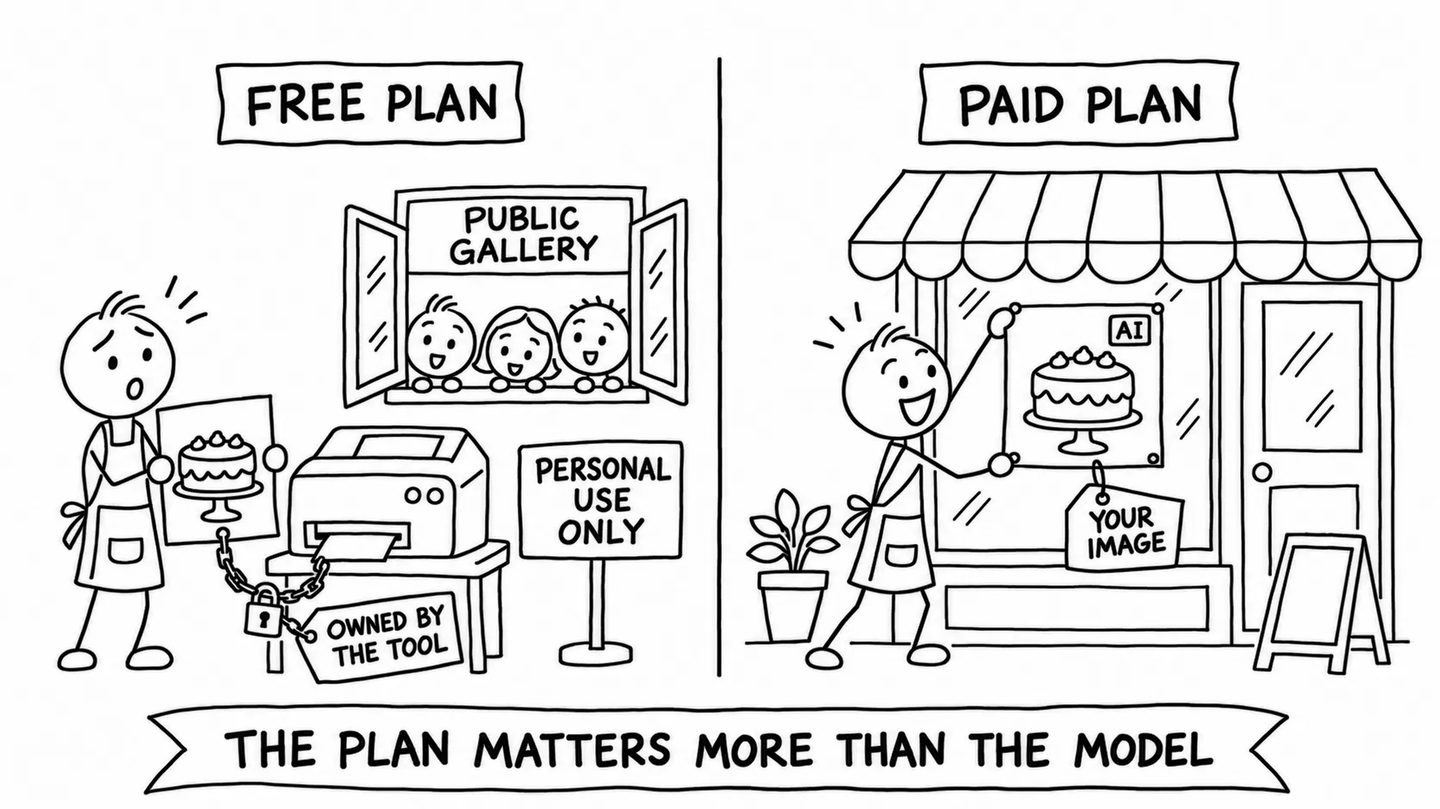
Short answer: in November 2026 OpenAI's GPT Image models lead both public blind-vote leaderboards, followed closely by Microsoft's MAI-Image-2.6 and Google's Nano Banana 2.1, which costs about a sixth of OpenAI's top setting, while Ideogram, Recraft, Midjourney and Adobe Firefly serve narrower jobs such as lettering, vector files and work inside Adobe's apps. Through the makers' own APIs one image costs from under a cent to about 21 cents, so the pictures themselves come to a few dollars a month. The plan matters more than the model: Recraft and Leonardo keep the rights to images made on their free plans, and Microsoft licenses its free Copilot and Designer for personal use only. Purely generated images get no copyright protection in the US, and in the EU a realistic image that could pass for a real person, product or place needs a visible label.
Recraft’s terms, updated on 21 October 2026, say of the images made on its free plan that “no commercial use of Free Tier Assets is permitted” and that “Free Tier Assets are owned by Recraft” (Recraft, 2026). Google’s AI Overview for the search “best AI image generator” names Recraft as the top choice for vector art. On Leonardo’s free plan, ownership of the rights in every output “will vest in us” (Leonardo.ai, 2026), and Microsoft’s free Copilot may be used only “for your own personal use” (Microsoft, 2026).
The pictures from the leading tools are good enough to put on a product page, which is why the terms carry so much weight. On arena.ai’s text-to-image leaderboard of 8 November 2026, built on more than 6.8 million blind votes, OpenAI’s GPT Image models fill the first five places, and the newest of them, GPT Image 2.6, came out on 4 November. The model at the top changes every few weeks. A business still has to settle the same four things each time: what one kept image costs, what the plan allows, whether anyone can stop a competitor from copying the picture, and whether the EU wants a label on it.
Which AI image generators can a business use in November 2026?
- OpenAI (GPT Image 2.6): released on 4 November 2026 in two variants, Sunburst and Flare, and “available globally today in ChatGPT and Codex across all subscription tiers” (OpenAI, 2026). The API still sells GPT Image 2.5, 2 and 1.5 and a cheaper mini model. The original gpt-image-1 was shut down on 23 October 2026, and DALL-E no longer appears on the price list.
- Google (Nano Banana 2.1 and Nano Banana Pro): Nano Banana is Google’s name for the image models in Gemini. The Gemini app makes images with Nano Banana 2 on every tier, including no plan at all, and lets AI Plus, Pro and Ultra subscribers redo them with Nano Banana Pro (Gemini Apps Help, 2026). Developers also get Nano Banana 2.1, released on 6 October 2026. Imagen 4, Google’s older image line, was shut down in the Gemini API on 17 August 2026. How Gemini and ChatGPT compare as assistants beyond pictures is in our comparison of Claude, ChatGPT and Gemini for business.
- Microsoft (MAI-Image-2.6): Microsoft’s own model, generally available to developers on its cloud since 27 October 2026 and billed by tokens. Microsoft’s free consumer tools that make images, Copilot, Designer and Bing Image Creator, come with the personal-use terms described below.
- xAI (Grok Imagine Image 2.0): sold through xAI’s API by quality and size.
- Midjourney V8.2: the default version since 24 July 2026, sold only as a subscription; “with a few rare exceptions that are explicitly granted, Midjourney does not provide an API.”
- Black Forest Labs (FLUX 3 Image): released on 1 October 2026 through BFL’s API, followed on 15 October by FLUX 3 Image Klein, a smaller model with open weights.
- Ideogram 4.5 and 4.0: from a company that says it “has led on typography in scene since launch”; version 4.0, released in June 2026, also has open weights.
- Recraft V4.1: makes vector files as well as pictures, priced separately.
- Adobe Firefly Image 5: Adobe’s own model, offered in Firefly alongside partner models such as GPT Image 2 and Nano Banana Pro.
- ByteDance Seedream 5.0 and Alibaba Qwen-Image 3.0: sold to developers through BytePlus and Alibaba Cloud.
Adobe Firefly and other design apps put several of these models behind one subscription. Choosing a model inside them also means accepting the platform’s terms on top of the model maker’s.
Which AI image generator is best?
Two public leaderboards rank image models by blind comparisons, and in November 2026 both put OpenAI first. On arena.ai, the board formerly known as LMArena, GPT Image 2.5 Sunburst leads the text-to-image ranking with 1,428 points, ahead of GPT Image 2.6 Sunburst, 2.5 Flare, 2.6 Flare and GPT Image 2. Next come Microsoft’s MAI-Image-2.6, Google’s Nano Banana 2.1, xAI’s Grok Imagine Image 2.0 and Reve 2.1 (arena.ai, 8 November 2026). Several scores are marked preliminary, among them those of both 2.6 models and Nano Banana 2.1, which rest on fewer than 5,000 votes each.
Artificial Analysis puts GPT Image 2.6 Sunburst first and prints each model’s price beside its score. At its maximum quality setting, GPT Image 2.6 costs $210.72 per thousand images on OpenAI’s API; Nano Banana 2.1, 83 points lower on the same board, costs $33.60 (Artificial Analysis, November 2026). The editing boards, which score changes to an existing picture, again lead with GPT Image 2.5 and 2.6, with Microsoft’s MAI-Image-2.7 preview, Nano Banana 2.1 and Krea 3 close behind. Midjourney, FLUX, Ideogram, Recraft and Firefly do not make the top ten of either text-to-image board.
The boards score general pictures made from their own test prompts, which leaves room for specialists in lettering, vector files and Adobe’s apps:
- Text inside the image: Google calls Nano Banana Pro “the best model for creating images with correctly rendered and legible text” (Google, 2025). Its model card for Nano Banana 2.1 lists “Poor text rendering in small text (often blurry in 1k model), long paragraphs” among the limitations (Google DeepMind, 2026), and OpenAI’s own guide says its model “can still struggle with precise text placement and clarity.”
- Vector files and logo sketches: Recraft generates both raster and vector images. Its API charges $0.08 per vector image.
- Work inside Adobe’s apps: Firefly’s own models are the ones Adobe describes as “safe for commercial use”; for the partner models in the same app, “you’re responsible for determining whether content generated by partner models is appropriate for your project” (Adobe, 2026).
Twenty test images of your own product on each of two models cost a few dollars at the prices below, and they answer the question for your shop better than either board can.
How much does an AI image cost?
Through the makers’ developer APIs, one standard-size image (1024 × 1024 pixels, called 1K) costs from under a cent to about 21 cents in November 2026. Prices are in US dollars before tax, as listed on 9 November 2026. OpenAI bills by tokens; the per-image figures for its models come from the calculator in its own image-generation guide and cover the output only.
| Model | Price per image (API) | Source |
|---|---|---|
| GPT Image 2.6 | $0.025 low, $0.044 medium, $0.053 high, up to $0.21 at the top setting (1K) | OpenAI image-generation guide, November 2026 |
| GPT Image 2.5 | $0.006 low, $0.013 medium, $0.053 high (1K) | OpenAI, November 2026 |
| Nano Banana 2.1 | $0.034 at 1K, $0.050 at 2K, $0.113 at 4K | Gemini API pricing, November 2026 |
| Nano Banana Pro | $0.134 at 1K or 2K, $0.24 at 4K | Gemini API pricing, November 2026 |
| FLUX 3 Image | $0.048 at 1K, $0.10 at 2K; FLUX 3 Image Klein from $0.008 | Black Forest Labs, November 2026 |
| Ideogram 4.5 | $0.03, $0.06 or $0.10 by quality | Ideogram, November 2026 |
| Recraft V4.1 | $0.035 per image, $0.08 per vector image | Recraft API pricing, November 2026 |
| Grok Imagine Image 2.0 | $0.04 to $0.08 by quality and size | xAI, November 2026 |
| Qwen-Image 3.0 Pro | $0.04 at 1K, $0.075 at 2K | Alibaba Cloud Model Studio, November 2026 |
GPT Image 2.6 spends about four times as many tokens as 2.5 on a low-quality picture, so OpenAI’s newest model costs four times as much at that setting. At high quality the two cost the same.
Most small businesses meet these models through a subscription instead. ChatGPT includes GPT Image 2.6 on every plan, with “Limited image creation” on the free tier and “Unlimited and faster image creation” on Pro, and publishes no counts (ChatGPT pricing, 2026). The Gemini app sets compute-based limits that refresh “every 5 hours until you reach your weekly limit.” Midjourney costs $10, $30, $60 or $120 a month from Basic to Mega, sold as 3.3 to 60 hours of fast generation time (Midjourney, 2026). Ideogram Plus is $20 a month, or $15 a month when billed yearly, for 2,400 credits, and Ideogram’s free plan gives 30 credits a week (Ideogram, 2026). Adobe Firefly Standard is $9.99 a month for 2,000 credits, and Firefly Image 5 uses 10 credits per generation, so the plan covers 200 of its images.
A worked example. A shop that needs 40 finished images a month (product backgrounds, social posts, a blog header) and keeps one in four generates 160. At the API prices above before rounding, converted at the European Central Bank’s rate of $1.1165 per euro on 6 November 2026:
- GPT Image 2.5, medium: $2.11 (€1.89)
- Nano Banana 2.1, 1K: $5.38 (€4.82)
- GPT Image 2.6, medium: $6.96 (€6.23)
- FLUX 3 Image, 1K: $7.68 (€6.88)
- GPT Image 2.6, high: $8.43 (€7.55)
- Ideogram 4.5, medium: $9.60 (€8.60)
- Recraft V4.1, vector: $12.80 (€11.46)
- Nano Banana Pro, 1K: $21.44 (€19.20)
- GPT Image 2.6, top setting: $33.71 (€30.19)
Most of the list stays under $10 a month, less than any paid plan above. Editing your own photo on OpenAI’s API adds the cost of the image you send in. None of these figures include the hours someone spends writing prompts, choosing between takes and fixing what the model got wrong.
Can you use a free AI image generator for business?
Several free plans rule out business use or keep the rights to what you make, and their terms say so in plain words:
- Recraft: free-tier images may not be used commercially, belong to Recraft, and may appear “in a public community gallery.” On a paid plan, “You own all Assets you create with the Services.”
- Leonardo.ai: on the free plan the output belongs to Leonardo; paid subscribers own theirs and can choose whether it is public or private.
- Microsoft Copilot, Designer and Bing Image Creator: Copilot is for “your own personal use.” Designer’s terms say its use “is for personal use only and not for use in the course of trade or commerce” (Microsoft Designer, 2024). Bing Image Creator describes its service as “for entertainment purposes” (Microsoft, 2026).
- Ideogram: commercial use is allowed on every plan, but “on the free plan, everything you generate is public,” and other users may remix it.
- Midjourney: there is no free plan. By default your images are “publicly viewable and remixable,” Stealth mode “is available only to Pro and Mega Plan members,” and “if you are a company or any employee of a company with more than $1,000,000 USD a year in revenue, you must be subscribed to a ‘Pro’ or ‘Mega’ plan to own Your Assets” (Midjourney, May 2026). The rule counts employees too, so a member of staff at a company that size who makes work images on a personal Basic plan does not own them under these terms.
- ChatGPT, Gemini and Canva: their terms set no business restriction on the free tiers. OpenAI assigns you “all our right, title, and interest, if any, in and to Output” (OpenAI, 2026). Google “won’t claim ownership” of generated content and adds, in its Gemini API terms, that it “may generate the same or similar content for others” (Google, 2026). Canva says you own your output and may use it “for any lawful purpose,” except a photo from Canva’s own library that you edit with its AI tools (Canva, 2026).
- FLUX [dev] open weights: BFL’s non-commercial licence for its [dev] models allows output to be used “for any purpose (including for commercial purposes),” but running the model counts as non-commercial only for testing and research “in a non-production environment” (Black Forest Labs, 2025). A business that generates its images with them in production needs BFL’s paid API instead.
Legal cover is rarer than ownership. An IP indemnity, the vendor’s promise to defend you if someone claims your image infringes their rights, appears in none of the free or consumer plans. OpenAI extends it to API customers and to ChatGPT Enterprise, Edu and Healthcare, and drops it if the output “was modified, transformed, or used in combination with products or services not provided by or on behalf of OpenAI” (OpenAI Service Terms, 2026). Google covers generally available Imagen, Veo and Gemini models on its cloud platform and Gemini in Workspace, not the Gemini app (Google Cloud, 2026). Adobe’s needs a separately contracted enterprise entitlement and excludes most partner models, Microsoft’s runs through volume licensing and excludes its consumer products, and Canva’s is for enterprise customers with over 100 seats. OpenAI’s, Google’s and Microsoft’s terms exclude trademark claims.
Who owns an AI-generated image?
In copyright terms, nobody owns the pixels a model produces on its own, while the parts a person contributes can be protected. The US Copyright Office set the pattern in February 2023 with Zarya of the Dawn, a comic book illustrated with Midjourney. It registered the author’s text and “the selection, coordination, and arrangement of the Work’s written and visual elements,” and excluded the images themselves, because they “are not the product of human authorship.” Changes the author made to one character’s lip were “too minor and imperceptible” to count (US Copyright Office, 2023).
The Office’s 2025 report on AI and copyrightability sets out what does count. “Where a human inputs their own copyrightable work and that work is perceptible in the output, they will be the author of at least that portion of the output,” and tools that let you redraw a chosen region of an image “can enable the user to control the selection and placement of individual creative elements,” which the Office will judge case by case (US Copyright Office, 2025). On 30 January 2025 it registered A Single Piece of American Cheese, an image made with AI tools, for the “selection, coordination, and arrangement of material generated by artificial intelligence,” with “AI generated image components” excluded (US Copyright Office, 2025). The courts agree on the starting point: the D.C. Circuit held in Thaler v. Perlmutter that a work must be authored “in the first instance by a human being,” and the Supreme Court declined the appeal on 2 March 2026. In Europe, the Municipal Court in Prague ruled in 2023 that an image made by AI is not a copyright work, because it is not the unique result of a natural person’s creative activity (10 C 13/2023).
A clause saying you “own” the output settles matters between you and the tool. A competitor can still copy a purely generated picture, and Google’s terms say the same or a similar image may be made for someone else.
A logo gets its protection from trademark law, which guards a sign that tells customers who sells the goods and asks nothing about who drew it: US law defines a trademark as “any word, name, symbol, or device” used to identify and distinguish your goods (15 U.S.C. § 1127), and the EU trade mark regulation lets “any natural or legal person” own one (Regulation 2017/1001, Article 5). An AI-generated logo can therefore be registered as a trademark if it is distinctive and does not clash with an earlier mark, even though copyright will not protect it. Who owns a logo that a designer draws for you is a contract question, covered in our guide to brand guidelines and the fine print behind the logo.
Can you show your products in AI images?
Yes, if the product still looks like itself. The European Commission’s guidelines on the AI Act treat “an AI-generated image of a product in advertisement or packaging that can affect the audience’s perception and mislead as to the actual product appearance, characteristics or use” as a deep fake, and give as examples “making the product appear not identical to the real product, more appealing or with improved quality than in real life.” A real product “shown in an advertisement against an AI-generated background” is not a deep fake as long as the ad does not mislead, and colour correction, background replacements “for clearly aesthetic purposes” and re-scaling are “likely to have only a minor impact” (European Commission, 2026).
Google Merchant Center, which feeds Shopping ads and free product listings, sets its own rule. “All images created using generative AI must contain meta data indicating that the image was AI-generated,” using the IPTC tag for trained algorithmic media, and sellers must not remove that tag (Google Merchant Center Help, 2026). The main product image “must clearly display the exact item being sold” and accurately show its “color, pattern, finish, and material” (Google Merchant Center Help, 2026).
Consumer law covers the rest without mentioning AI. The EU’s Unfair Commercial Practices Directive treats a practice as misleading if it “deceives or is likely to deceive the average consumer, even if the information is factually correct,” about “the main characteristics of the product” (Directive 2005/29/EC, Article 6). A generated bottle with a cleaner label, a glossier finish or a size it does not have can be a misleading product photo, whoever made it. Since September 2026 the same directive also bans vague green claims and self-made eco labels, as our article on greenwashing and what a product page may still claim sets out.
Using a real person’s likeness requires their consent. New York law requires “the written consent of such person” before a person’s name or likeness is used in advertising (N.Y. Civil Rights Law § 50), and a law signed in December 2025 requires advertisers to “conspicuously disclose” a synthetic performer in an ad (N.Y. General Business Law § 396-b).
Do you have to label AI images?
In the EU, the AI Act splits the job in two. Article 50(2) obliges the providers of image generators to mark every output “in a machine-readable format and detectable as artificially generated or manipulated” (Regulation 2024/1689). Tools already on the market before 2 August 2026 have until 2 December 2026 to comply, under the amending Regulation 2026/1744. The large makers already do it: images from ChatGPT and OpenAI’s API carry both C2PA Content Credentials and SynthID watermarks (OpenAI Help Center, 2026), and Google says all media “created or edited with Gemini Apps includes an invisible SynthID watermark” (Gemini Apps Help, 2026). How these invisible marks work, and how easily a screenshot strips them, is explained in our article on AI watermarking.
Since 2 August 2026, a business that publishes a deep fake, an AI image that could pass for a real person, object, place or event, must disclose it, and the Commission’s guidelines say the label has to be perceivable by people: “deployers cannot rely on the machine-readable marking.” The EU’s voluntary Code of Practice offers an “AI” icon and suggests placing it “in the top right corner of an image,” or next to the image frame on a website (Code of Practice, 2026). Pictures that could not be mistaken for real ones need no label: the guidelines’ own example is “an AI-generated image of a scene involving a sphinx flying over the Eiffel Tower.” A deep fake that is part of an evidently artistic or satirical work still needs a disclosure, made in a way that does not spoil the work. What else the AI Act asks of businesses from August 2026 is in our guide to the EU AI Act.
Meta reads the same metadata for its ads. It looks for “the ‘AI generated’ information in the C2PA and IPTC technical standards” (Meta, 2024), and its help center says it shows “AI info” in the “About this ad” screen for ad images “created or edited using third-party AI tools,” leaving it off for “minor changes or enhancements like image resizing or color correction”; a written AI disclosure is compulsory only in ads about social issues, elections or politics. Google Ads requires an AI disclosure in election ads, and its misrepresentation policy applies to every image: “Manipulating media to deceive, defraud, or mislead others is not allowed” (Google Ads policy, 2026). For video, which adds YouTube’s and TikTok’s rules, the full picture is in our guide to AI video generators for business.
Where do AI images earn their keep for a small business?
- Edit your own photos before you generate new ones. A new background, a wider crop or a seasonal setting around a real product photo is the use the Commission calls minor, it keeps the product listing accurate on Merchant Center, and your photograph stays the part of the image you can protect.
- Set the words yourself. Prices, opening hours, addresses and anything legal belong in a design tool, typed in a font you hold a licence for. Generated lettering is good enough for a mood board and still unreliable in small sizes and long lines, on the makers’ own admission.
- Test on your own brief. Run the same three prompts, written like a creative brief for a designer, on two models before you pay for a year of either. The leaderboards rank pictures nobody in your market will see.
- Pay for the plan that gives you the rights. A paid tier costs $10 to $20 a month at most of these makers, and on several of them it decides whether you own your images or hand them to the tool and its public gallery. A company with more than $1 million in revenue needs Midjourney Pro or Mega.
- Keep the files, the prompts and the metadata. Download originals at full size, store the prompt with each one, and leave the C2PA and IPTC data in place: Canva’s and Bing’s terms forbid removing it, and Merchant Center requires it.
- Ask before you show a real person, and register the logo you keep. Using a customer’s, employee’s or celebrity’s likeness requires their consent, and a realistic image of them needs a label in the EU. An AI logo can be a starting sketch; the version you trademark is the one worth paying a designer to finish, at the prices in our breakdown of what branding costs.
If you would rather have a designer make the images, or check the ones you generated before they go live, that is part of our graphic design and content production work, and you can send us one brief.