

Copilot vs ChatGPT for Business: What Microsoft 365 Already Includes, and When a Paid Seat Pays Off
- Published —
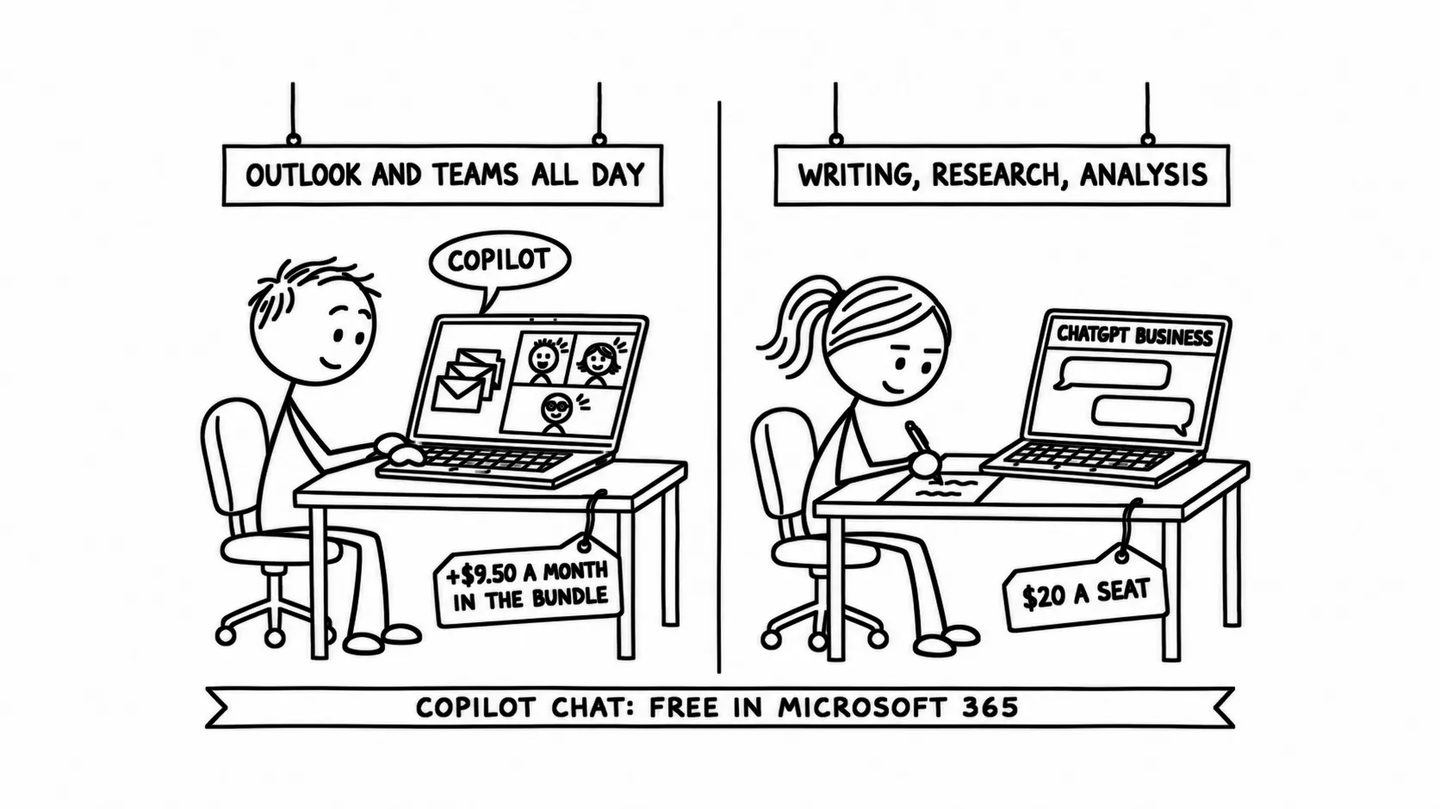
Short answer: if your company already pays for Microsoft 365, start with Copilot Chat, which work accounts on Microsoft 365 business plans get at no extra cost, and buy paid Copilot only for the people who spend their day in Outlook, Teams and Word, after you have checked who can open which files. Bought with Business Standard, a paid Copilot seat adds $9.50 per person a month; added to an existing plan it costs $21. ChatGPT Business, at $20 per person a month on a yearly plan, is the better buy when the work is writing, research and analysis outside Microsoft's apps.
Microsoft includes one version of Copilot in its business plans for free. It calls it Copilot Chat and offers it “at no additional cost for all Microsoft Entra account users with an eligible Microsoft 365 subscription” (Microsoft, 2026). It answers from the web, reads files you hand it, and sits in Outlook and the Microsoft Copilot app. The paid version adds access to the user’s own mail, files, chats and meetings, and that access is what a business decides to buy or skip when it compares Copilot with ChatGPT.
The UK and Australian governments tested the paid version on thousands of staff in 2024. The UK’s business department found no evidence that the time it saved made anyone more productive.
Which Copilot is which?
Microsoft uses the name for several products, and two renames in two years have not made them easier to tell apart. The Microsoft 365 app became the Microsoft 365 Copilot app in January 2025 and is now called the Microsoft Copilot app on the web, on phones and on Windows (Microsoft Support, 2026).
- Copilot Chat: the free tier for work and school accounts on an eligible Microsoft 365 plan, with web search, file uploads and agents billed by use.
- Microsoft 365 Copilot: the paid seat, sold as Copilot Business to organisations with up to 300 users and under its full name to larger ones. It reads what the user can already open in Microsoft 365 and works inside Word, Excel, PowerPoint, Outlook and Teams.
- Microsoft 365 Personal, Family and Premium: consumer subscriptions with Copilot included under usage limits. Premium “combines everything in our Microsoft 365 Family and Copilot Pro subscriptions”, and Microsoft no longer sells Copilot Pro on its own (Microsoft, 1 October 2025).
- GitHub Copilot: a different product, “an AI assistant that helps you write, understand, and ship software” (GitHub Docs, 2026), at $19 a seat on its Business plan. Our guide to choosing an AI tool for software work covers it.
Is Copilot free for a business?
Copilot Chat is free for a business that already pays for an eligible Microsoft 365 plan, and the Business plans are among them. Microsoft’s pricing page lists “web-grounded AI chat”, “Copilot in select Microsoft 365 apps” and agents “priced on a metered basis”, and its footnote narrows the apps: “Includes Outlook and the Microsoft Copilot app. Availability in Word, Excel, PowerPoint, and OneNote may vary by market and customer licensing.” Microsoft’s admin overview is stricter and says Copilot Chat users “don’t have access to Copilot in Word, Excel, PowerPoint, and OneNote” (Microsoft Learn, updated 17 November 2026), so check what your own tenant shows before you plan around it.
The free tier does not look through your mailbox or your SharePoint on its own. You “copy and paste content, upload a file, or select a file when creating your prompt”. Agents “grounded in instructions and public websites are included”, and any agent that goes further is pay-as-you-go.
Copilot Chat still runs under the business contract. Its enterprise data protection applies “under the Data Protection Addendum (DPA) and the Product Terms”, with Microsoft as data processor, and “prompts and responses aren’t used to train the underlying foundation models” (Microsoft Learn, 2026). For a firm that has staff pasting client documents into free consumer chatbots, that alone is a reason to point them at Copilot Chat.
Microsoft raised the price of the plans that carry it this year. On 1 July 2026 Business Basic went from $6 to $7 per user a month and Business Standard from $12.50 to $14, with Business Premium unchanged at $22, and the same update added “Copilot Chat enhancements”, including “inbox and calendar awareness and access to Word, Excel, and PowerPoint agents” (Microsoft, 2026). Existing customers pay the new price at their first renewal after that date.
How much does a paid Copilot seat cost?
A paid Copilot seat costs $9.50 to $30 per person a month, depending on how you buy it. The cheapest route is a bundle: Business Standard with Copilot costs $23.50, which is $9.50 more than Business Standard alone. The same Copilot added to an existing plan costs $21. US prices come from Microsoft’s business pricing page, the euro prices from its Slovak page, which states that they exclude VAT; ChatGPT’s come from OpenAI’s business pricing and its Slovak price list.
| Plan | US, per user a month, yearly plan | Euro area, per user a month, yearly plan, before VAT | What it gives the user |
|---|---|---|---|
| Business Basic | $7 | €6.07 | web and mobile Office apps, mail, Teams, Copilot Chat |
| Business Standard | $14 | €12.13 | adds the desktop apps; Copilot Chat |
| Business Standard with Copilot | $23.50 | €20.36 | paid Copilot in the apps, Teams and chat |
| Business Premium with Copilot | $32 | €27.73 | the same, plus Premium’s security and device management |
| Copilot Business add-on | $21 ($18 promotion) | €18.20 (€15.60 promotion) | paid Copilot added to an existing Business plan |
| Microsoft 365 Copilot add-on | $30 | €26.00 | the seat for organisations over 300 users |
| ChatGPT Business, standard seat | $20 | €17.07 | OpenAI’s team plan |
Monthly billing costs 20% more on Microsoft’s business plans: $25.20 for the add-on, $28.20 for Business Standard with Copilot. The promotional add-on price runs “between July 1, 2026, and December 31, 2026”, needs an annual commitment and “applies to the first year only”. Microsoft does not mark the bundle prices as promotional, but the same footnote warns that “offers and discounts may vary between Microsoft 365 plans with Copilot and add-ons”. The business plans cap a company at 300 licences.
The seat is not the whole bill. “Everyday AI experiences” are included, while “Copilot Cowork, Code, Autopilot, and the Work IQ APIs” are billed by use in Copilot Credits, with spending limits an administrator sets in the Microsoft 365 admin center. From 1 December 2026 Microsoft will also sell Copilot and Copilot Business “without a qualifying Microsoft 365 base subscription”, at the same prices (Microsoft Partner Center, October 2026).
ChatGPT Business costs “$20/month if billed annually. $25/month if billed monthly” for a standard seat, and $100 or $125 for a premium seat with higher limits. OpenAI’s pricing page says the plan starts at two users; its billing help says one paid seat is enough to open a workspace (OpenAI Help Center, 2026). In Slovakia OpenAI lists €21 a month on a yearly plan and €26 month to month, both including 23% VAT.
What does a year cost a five-person company?
Take five people on Business Standard, billed yearly in the US. Microsoft 365 alone costs $840 a year, Copilot Chat included. Moving all five to Business Standard with Copilot makes it $1,410, so paid Copilot adds $114 per person a year. Buying the add-on instead, for all five on top of Business Standard, makes it $2,100 at list price and $1,920 in the promotional first year. For the same five people, ChatGPT Business adds $1,200 a year to the Microsoft 365 bill if paid annually, or $1,500 a year if paid monthly.
In euros before VAT the same company pays €727.80 for Business Standard, €1,221.60 for Business Standard with Copilot (€98.76 more per person a year), and €1,024.20 for five ChatGPT Business seats.
Next to what staff time costs, these prices are small. We valued an hour of staff time at $40. At that rate, the bundle’s extra $9.50 a month is equivalent to about 14 minutes of work. The $21 add-on comes to about 32 minutes a month and a ChatGPT Business seat to about 30. Australia’s Treasury did the same sum for its own staff and found a mid-level officer “would need to redirect approximately 13 minutes” a week to cover the licence. The UK trial and the field experiment below both report more time saved than that.
Is Microsoft 365 Copilot worth it? What the trials measured
The trials point the same way: Copilot speeds up email and summaries and helps little with complex analysis.
- UK government, 20,000 staff: in a trial across 12 organisations from 30 September to 31 December 2024, “on average, users observed a time saving of 26 minutes per day”. The figure is self-reported, and the report adds that “it was not possible to identify how time saved was spent” (GOV.UK, June 2025).
- UK Department for Business and Trade, 1,000 licences: its evaluation “did not find evidence that time savings have led to improved productivity”. In observed tasks, Copilot users did Excel data analysis “more slowly and to a worse quality and accuracy than non-users” and made PowerPoint slides “over 7 minutes faster on average, but to a worse quality and accuracy”, while summaries and emails came out faster and better. 22% of respondents reported hallucinations (GOV.UK, August 2025).
- Australian Treasury, 218 staff for 14 weeks: “participants had high expectations of the product which were not met”, “Copilot was not appropriate for more complex tasks”, and the evaluators saw no “clear evidence that Copilot helped improve work outcomes” (Australian Treasury, February 2025).
- 66 companies, 7,137 employees, six months: in a field experiment, “the 80% of treated workers who used this tool spent two fewer hours on email each week”, and the authors “do not detect shifts in the quantity or composition of workers’ tasks” (Dillon, Jaffe, Immorlica and Stanton, 2025). Microsoft Research staff are among the authors.
All four ran before spring 2025. The models behind it have changed since, so the trials say more about which kind of work it helps with than about how accurate it is today. Read together, they point to the people with the most mail and documents to summarise as the ones a paid seat helps first, and to spreadsheets as the place where its answers need checking.
Can Copilot see all my files?
Paid Copilot sees what each user can already open, and nothing more. Microsoft’s wording is that it “only surfaces organizational data to which individual users have at least view permissions” (Microsoft Learn, 2026). A salary spreadsheet shared with the whole company in 2021 and forgotten becomes something any colleague can find by asking Copilot a question.
Microsoft’s own deployment guidance puts this first. Its blueprint for a Copilot rollout starts with “Remediate oversharing” and notes that SharePoint Advanced Management, the tool for finding overshared sites, “is included with your Microsoft Copilot license” (Microsoft Learn, November 2026). Its Restricted Content Discovery setting can keep chosen SharePoint sites out of Copilot’s answers, but it “doesn’t change existing permissions” (Microsoft Learn, 2026), so the files stay open to anyone who finds them another way.
The same question comes back with ChatGPT once it is connected. ChatGPT Business can connect to Outlook, Teams and SharePoint (OpenAI, 25 September 2025) and search them through its company knowledge feature (OpenAI, 23 October 2025), “apps are enabled by default” in Business workspaces, and the Microsoft connections need an administrator’s consent in Microsoft Entra.
Does Copilot or ChatGPT train on your data, and where is it stored?
Neither trains its models on a business customer’s data by default. Microsoft says that “prompts, responses, and data accessed through Microsoft Graph aren’t used to train foundation LLMs” (Microsoft Learn), and OpenAI says of ChatGPT Business, Enterprise and its API: “By default, we do not use your business data for training our models” (OpenAI, January 2026). ChatGPT Business has passed a SOC 2 Type 2 audit, and deleted conversations are removed from OpenAI’s systems within 30 days.
- Copilot in the EU: “For EU customers, Microsoft Copilot is an EU Data Boundary service.” Two exceptions sit in Microsoft’s own documents. “Models provided by Anthropic as a subprocessor are currently excluded from the EU Data Boundary”, and EU and UK tenants have Claude models “disabled by default” (Microsoft Learn, 2026); Microsoft says Claude will run inside the boundary by the end of 2026 (Microsoft, 5 November 2026). And in tenants that allow flex routing, “during periods of peak demand, Copilot prompts, responses, and grounding data may be processed outside the EU Data Boundary”, including in the United States, Canada and Australia (Microsoft Learn, October 2026).
- ChatGPT in the EU: data residency in Europe has been available since February 2025 for ChatGPT Enterprise, Edu and the API, for new workspaces (OpenAI, 5 February 2025). ChatGPT Business now “lets you choose where your workspace’s customer content is stored” when the workspace is set up, without naming the regions, and abuse-monitoring logs “are stored in the United States, regardless of the storage region you select” (OpenAI Help Center, 2026).
Under the EU’s AI Act, a company that uses either tool is a deployer and must make sure its staff understand the tool well enough to use it. Our guide to what the AI Act asks of small businesses explains that duty.
Copilot or ChatGPT: which is better for which job?
Copilot fits work that lives in Microsoft’s apps, and ChatGPT fits work that starts outside them. Copilot runs on OpenAI’s models, the family behind ChatGPT, and on Anthropic’s: Microsoft 365 Copilot has offered Anthropic’s models since September 2025, and in July 2026 Microsoft put Claude Opus 5 into the model selector in Word, Excel, PowerPoint, Chat and Copilot Cowork (Microsoft Tech Community, 24 July 2026); a Copilot seat includes “GPT-5.6 and Sonnet 5”, with newer models “included with limits” (Microsoft Tech Community, 25 September 2026).
Copilot’s advantage is inside Microsoft’s apps: it “recaps meetings and highlights action items from chats” in Teams, drafts and summarises in Outlook, and finds the right file in SharePoint without being handed it. ChatGPT works as a separate workspace, which suits writing, research and analysis that starts from a blank page or from files outside Microsoft 365; our comparison of Claude, ChatGPT and Gemini covers how it compares on those jobs.
Microsoft publishes its own case against ChatGPT. Its “Compare Copilot vs. ChatGPT Enterprise” page says Copilot “helps prevent data leaks before they start. ChatGPT doesn’t”, citing footnotes that describe the evidence as “simulated video”, and a cost study Microsoft commissioned from GigaOm and tested itself puts Copilot at $30 a month for “the everyday AI user” against $81 for ChatGPT (Microsoft, 16 November 2026).
- A team that works in Outlook and Teams all day: use Copilot Chat first, then buy paid seats for the people with the most mail and meetings, preferably through the bundle.
- A team whose AI work is writing, research or analysis: ChatGPT Business, at $20 a seat, covers it, and Copilot Chat stays free alongside.
- A company on Google Workspace: neither of these is the natural choice; Gemini comes with the plan.
- A team whose files are shared loosely: fix the sharing before buying Copilot seats, or the assistant will surface what was never meant to be found.
What about a sole trader or a family plan?
Microsoft’s consumer plans now include Copilot. In the US, Microsoft 365 Personal costs $99.99 a year with “Advanced Copilot chat with higher usage than free”, Family costs $129.99 with Copilot “for account holder only”, and Premium costs $199.99 with “extensive usage” and the Researcher and Analyst agents; “AI features are not available in Microsoft 365 Basic” (Microsoft, 2026). In the euro area the same plans cost €99, €129 and €219 a year.
These are consumer subscriptions. Enterprise data protection is a promise made in Microsoft’s business contract, so a sole trader who handles client data is better covered by Business Basic with Copilot Chat at $7 a month.
Adding Copilot raised consumer prices, and it has cost Microsoft a lawsuit. Australia’s competition regulator sued Microsoft in October 2025, alleging it told 2.7 million subscribers to accept a price rise of up to 45% or cancel, while “there was an undisclosed third option, the Microsoft 365 Personal or Family Classic plans” without Copilot (ACCC, 27 October 2025). We found no judgment by November 2026. Microsoft’s support pages still list Personal Classic and Family Classic among the plans a subscriber can switch to.
If you want help deciding who in your team should get which seat, and with tidying file sharing before Copilot reads it, that is part of our AI and automation work, and you can tell us how your team works.