

How to Run Google Ads in 2026: The Five Decisions That Are Still Yours
- Published —
- Updated —
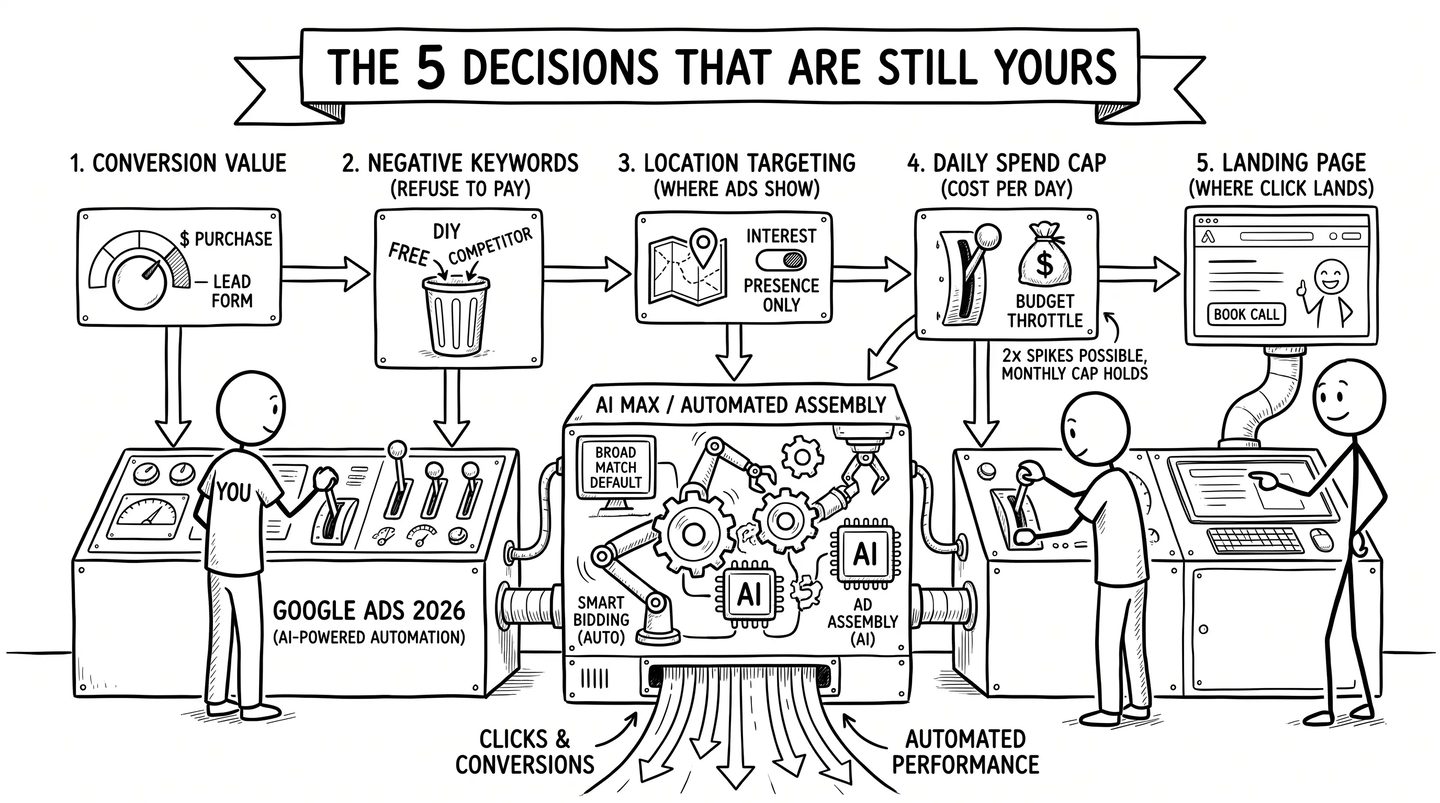
Short answer: you run Google Ads well in 2026 by making five decisions the platform has not automated away. Decide what a conversion is worth, which searches you refuse to pay for, where your ads are allowed to show, what a day of spend may cost, and where the click lands. Bidding, matching, and ad assembly now largely run themselves, increasingly whether you ask or not. Make the five calls deliberately and the automation works for you; skip them and it spends for you.
Google’s documentation states it plainly: on any given day, a campaign “might spend up to twice your average daily budget” (Google Ads Help, 2026). That is not a billing error. It is the platform working as designed, and it is a fair summary of what running Google Ads means now: the system makes more decisions with less of your input. Keywords default to broad match, bidding defaults to automation, and since September Google has been moving a wave of Search campaigns to its AI Max setup whether their owners chose it or not.
None of that makes the channel bad. It makes most of the advice about it dangerous, because the advice was written for a platform that no longer exists. Advertisers have noticed: in the search-demand data we pulled in July 2026, queries like “google ads best practices” and “google ads tutorial” more than tripled year over year, with most of the jump landing in June 2026. People are re-learning the tool underneath them. This is the current version, from Google’s own documentation and from practitioners who manage large budgets, written by an agency with nothing to sell you inside it.
What changed in Google Ads by 2026?
If you learned Google Ads before 2024, your mental model is stale in specific, dated ways:
- Broad match became the default. Google’s keyword documentation now says it outright: “Broad match is the default match type that all your keywords are assigned” (Google Ads Help, 2026). Ads can show on searches that don’t contain your keyword’s direct meaning. If you did not choose a match type, one was chosen for you.
- Manual bidding lost its training wheels. Enhanced CPC was retired for Search and Display campaigns in the week of 31 March 2025; campaigns still using it fell back to Manual CPC (Google Ads Help, 2025). The middle ground is gone: you bid by hand or you hand bidding to the machine.
- AI Max went from beta to mandatory-for-some. Google’s AI feature bundle for Search campaigns left beta on 15 April 2026 (Google, 2026). On 1 September 2026 Google began automatically upgrading campaigns that used the campaign-level broad match setting or automatically created assets to it, spread across the month and with no opt-out offered; it has not announced that the migration is finished (Google’s migration notice for developers, 2026). New Search campaigns now start with AI Max switched on (Google Ads Help), and Dynamic Search Ads got a reprieve to February 2027. We covered the decision this forces in AI Max vs Performance Max.
- Performance Max stopped being a total black box. Since 2025 it has a channel-level performance report, a full search-terms report, and campaign-level negative keywords with a cap of 10,000 instead of the old 100 (Google Ads Help, 2025–2026). In October 2026 Google began rolling out channel priority tiers, with an optional spending cap on low-priority channels (Google, 2026). The controls exist now; most accounts simply never use them.
- Display is being folded into Demand Gen. Google announced in May 2026 that standalone Display campaigns get a new home inside Demand Gen, with the transition expected to complete by 2027 (Google’s announcement, 2026). A migration tool began a phased rollout in June; remaining Display campaigns will be moved automatically later (Google Ads Help).
- Ads reached AI answers, but not in Europe. Ads inside AI Overviews run in English in twelve countries, from the US and Canada to India and Nigeria, and ads in AI Mode in eleven of them (Google Ads Help). Google took AI Mode ads beyond the US on 28 October 2026 and named Brazil, Mexico and the United Kingdom as next (Google, 2026). None of them is in the EU: as of November 2026 there are no ads inside Google’s AI answers anywhere in the Union.
- A bidding change landed on 17 August 2026. Budget-limited campaigns using target-based bidding now behave differently. It moved real money with far less attention than AI Max got; details below.
Every date above is why generic setup tutorials mislead. The steps still look similar. The consequences of each step changed.
Before the campaign: decide what a conversion is worth
Google’s automation optimizes toward whatever you define as success. Define nothing, and it optimizes toward clicks, which is how budgets evaporate politely. So the first work happens outside the campaign builder.
Set up conversion tracking first. Install the Google Tag or link GA4, then define the one or two actions that represent money: a purchase, a submitted lead form, a booked call. Assign values, even rough ones. Every bidding decision the system makes later inherits the quality of this definition. Frederick Vallaeys, one of Google’s first five hundred employees and now CEO of Optmyzr, put it in July 2026 in a piece on value-based bidding: “The technology is not the difference. The data is” (Optmyzr, 2026). Accounts that track the wrong conversion optimize confidently toward the wrong customers.
In the EU, consent comes first. Consent Mode v2 has been required for EEA advertisers since March 2024 (Google Ads Help), and reporting through 2025 and 2026 describes Google silently disabling remarketing and degrading conversion measurement on accounts whose consent banners do not pass the required signals (ppc.land, 2026). A cookie banner that looks compliant is not the same as one that transmits consent.
Then look at where the click lands. The auction decides what a click costs; the page decides whether it pays. A slow page, a vague offer, or a form with nine fields will defeat a perfectly built campaign. If the site itself is the weak link, fix that first; we wrote about what a website that converts actually costs.
How do you set up a Google Ads campaign in 2026?
The build itself takes under an hour. The order matters more than the clicks, and the interface labels drift with UI rollouts, so anchor on the structure.
- Create the account without a campaign. Google’s signup flow pushes you straight into a guided campaign wizard. Decline it: the option to “create an account without a campaign” still exists, near the bottom of the flow (Google Ads Help, 2026). You want billing, time zone, and currency settled before anything can spend. Time zone and currency cannot be changed later.
- Start with a Search campaign. Pick the Leads or Sales objective, then Search as the type. This is the strongest consensus among practitioners with real spend behind them: Ben Heath, whose agency reports more than $300M in managed ad spend, put it directly in June 2026: start with Search and “forget the more complicated campaign types like Performance Max & Display” until you have data and experience (LinkedIn, 2026). Aaron Young, managing Google Ads since 2010, says the same: Search remains the core foundation of a profitable account (Define Digital Academy, 2025). Search captures people already looking for what you sell; everything else is graduate school.
- Choose keywords for buyers, not readers. Ten to twenty keywords per ad group around one tight theme, phrased the way a customer about to spend money searches. Set match types deliberately, because broad is now the silent default. The freshest independent data backs the old discipline: in Optmyzr’s May 2026 study of 30,000 accounts, broad match now takes the largest share of budgets, but exact match still wins on efficiency and phrase “consistently punches above its weight on conversions.” Their conclusion is the sane starting plan: exact for your high-value core, phrase as the workhorse, broad only once real conversion data can steer it (Optmyzr, 2026).
- Write ads that say the quiet part. Responsive search ads want several headlines and descriptions; make them concrete: what you sell, for whom, the proof, the price posture, the action. Add the free ad assets (sitelinks, callouts, call button): they make the ad physically larger.
- Set the guardrail settings below, then launch. Not the other way around.
The settings that quietly spend your money
These defaults are where new accounts leak. LocaliQ’s analysis of thousands of accounts puts the average wasted spend at over $1,100 per month per account (WordStream/LocaliQ, 2026); most of that waste starts as a checkbox nobody unticked. Change these at launch, not after the first invoice.
- Search partners: included by default on every new Search campaign (Google Ads Help, 2026). This extends your ads to a network of non-Google sites with mixed quality. Untick it at the start; re-add it later if the numbers earn it.
- Display expansion: the Display Network option comes pre-selected in the campaign flow, per current practitioner guides (2025). A Search budget bleeding into banner placements is the classic silent leak. Untick.
- Location targeting: the default is “Presence or interest,” which includes people merely interested in your area, and Google’s own docs still recommend the broad setting (Google Ads Help, 2026). Practitioners running local budgets overwhelmingly switch to “Presence” so a plumber in Bratislava pays for people in Bratislava, not people reading about it. This is one of the few places where the right call is to politely ignore the recommendation.
- Auto-applied recommendations: officially opt-in, but audit them anyway under Recommendations → Auto-apply settings. Ad suggestions can go live 14 days after Google drafts them unless you dismiss them, and practitioner reporting has repeatedly found auto-apply options enabled on accounts that never chose them (Search Engine Land, 2025). Decide what the machine may change without asking; for a new account the defensible answer is nothing.
- Negative keywords: the one control that never got automated. Read the search-terms report weekly, add what you refuse to pay for (free, jobs, DIY, competitor brands you don’t want), and build the list forever. It works in Performance Max now too.
Is $10 a day enough for Google Ads?
The budget question people actually ask, per Google’s own “people also ask” box, is whether $10 or $20 a day is enough. The answer is arithmetic, not opinion.
Your real budget is monthly: Google caps spend at your daily budget × 30.4, while any single day can run up to double, as covered above. So $10 a day is roughly $300 a month. Whether that is enough depends entirely on what a click costs in your market and what share of clicks convert. The median cost per click across US industries is $5.42, with a median conversion rate of 8.18%, per LocaliQ’s 2026 benchmarks of 13,474 campaigns. At that price, $10 buys fewer than two clicks a day: a handful of conversions a month, which is a slow drip of data for a system that wants at least 30 conversions a month to bid intelligently. The same $300 in a market with €0.30 clicks buys a thousand clicks and a real experiment. Cost per click on the Slovak market typically runs €0.18 to €2.40, per a Slovak agency’s July 2026 analysis drawing on €23M of managed spend (Starbomedia, 2026), a fraction of typical US service-industry prices.
Three practical rules fall out of the math. Budget monthly and judge monthly, because daily wobble is designed in. Size the budget to buy enough clicks for at least a few conversions a week, or shrink the geography and keyword set until it does. And the recurring “why did Google charge me $500” complaint is usually this same design read as a bug: billing triggers at thresholds, days can spike, and the month, not the day, is the promise. There are no free clicks; if the arithmetic does not close, the better alternative is the organic route, not a smaller version of the paid one.
When should you hand bidding to the AI?
Smart Bidding works well when it has data, and flails theatrically when it does not. The sequencing that respects this:
- Start simple while data accumulates. With a fresh account and unproven tracking, start with Maximize Clicks with a strict CPC cap, or Manual CPC if you want full control (still available in 2026). The goal of month one is not efficiency; it is verified conversion data.
- Switch to conversion-based bidding once tracking is trusted. Maximize Conversions or Maximize Conversion Value, without a target, once conversions record reliably.
- Add targets when volume justifies them. Google’s own guidance is to evaluate over periods containing at least 30 conversions a month (50 for Target ROAS) (Google Ads Help, 2026), with an eligibility floor for Target ROAS on Search of 15 conversions in 30 days (Target ROAS guide, 2026). Independent practitioners land on the same numbers from their own data: Grow My Ads tells clients to wait for 30 conversions in the last 30 days and to set the first Target CPA slightly above the current average, then step it down weekly (2026); Smarter Ecommerce’s dataset of 4,000+ Performance Max campaigns calls 30 monthly conversions the floor and 60+ optimal (smec, 2025). Below that, a target is a wish, not a constraint.
- Respect the learning period. Current docs say the “Learning” status “never lasts more than 7 days,” but performance “typically converges to your new goal within 1 to 2 conversion cycles” (Google Ads Help, 2026). Google also advises against several target changes within a single conversion cycle. Change one thing, wait, read, repeat.
And the dated change: on 17 August 2026, target-based bidding changed for budget-limited campaigns, and Google completed the global rollout on 27 August (Google’s FAQ on the change, 2026). Until then, a budget-limited campaign with a loose target could over-perform it, because the algorithm chased the cheapest conversions under the cap; the target worked as a ceiling, not a goal. Those campaigns now “perform more consistently toward your bid target.” Google’s own example: a campaign with a $10 target CPA that was delivering $5 conversions “now delivers more closely to a $10 USD actual CPA” (Google Ads Help, 2026). Grow My Ads, a Google Ads-only agency running budgets from $5k to $500k a month, called the old behavior close to the best-kept secret in Google Ads and expected the change to inflate auction prices as advertisers adjusted unevenly (2026). The check takes minutes: find every campaign showing “Limited by budget” with a target looser than its last-30-day actuals, then either raise the budget or step the target toward reality one notch a week. Google changes neither for you, and it calculates no recommended target for campaigns with fewer than seven conversions.
Which campaign type should you run in 2026?
- Search: the default answer for services, local businesses, and anyone whose customer types intent into a box. Full reporting, full control, and the surface where the five decisions above all still apply.
- Performance Max: earns its keep for e-commerce with product feeds. In practice it is a feed engine: feed-based ads make up 74–97% of PMax cost in a large European dataset (smec, 2025), and among retailers running both PMax and standard Shopping, PMax took 62% of Google Shopping spend in Q3 2026 (Tinuiti, 2026). With channel reporting and 10,000 negative keywords it is far more inspectable than its 2023 reputation, but where PMax and Search overlap on the same queries, Search still wins on clickthrough and conversion rate far more often than it loses (Optmyzr, 503-account study, 2025).
- Demand Gen: the visual and video side (YouTube, Discover, Gmail, and now Display’s inventory). A second-act channel: run it when Search is profitable and you want more demand, not before.
- AI Max: not a campaign type but the AI feature bundle inside Search; since September it may already run in part of your account without anyone choosing it, and new Search campaigns start with it on. Which features to keep, and whether to move the rest on your own terms, is the question we answered in AI Max vs Performance Max.
Is Google Ads still worth it in 2026?
For businesses whose arithmetic closes, yes, and more measurably than almost any other channel. But the case has two halves.
The case for: buying intent is still concentrated in the search box, clicks are still auctioned, and a well-governed account converts them at a knowable cost. The money agrees: US Google search ad spend grew about 14% year over year in each of the first three quarters of 2026 (Tinuiti, 2026). The case for caution: the auction is tightening and attention is fragmenting. In Q3 2026 the cost per click rose 4% year over year after a year of flat prices, while click growth slowed to 9% (Tinuiti, 2026). Across 21,425 accounts, impressions served fell 11% between Q1 2025 and Q1 2026, and Optmyzr’s Q3 2026 edition still put the median cost per acquisition 4.2% above a year earlier (Optmyzr, 2026). Google now answers many informational searches itself with AI Overviews; assistants like ChatGPT recommend businesses in answers outside Google’s auction, and since late August 2026 ChatGPT has also sold ads in 31 European countries (OpenAI, 2026). Paid search in 2026 is a precision tool for capturing demand, not a growth strategy on its own; creating demand among people who never searched is Meta’s side of the paid equation. The organic half, being the business AI assistants actually recommend, costs discipline instead of media budget and compounds while you sleep; and where ads inside AI assistants are heading is its own story.
What not to buy
The re-learning wave has a merchandise stand, and most of it is safe to walk past.
- Courses recorded before 2026: the platform has shipped breaking changes three times since most bestselling courses were recorded. Google’s own Skillshop training is free; current practitioner channels are free.
- “Google Partner” as a guarantee: the badge reflects certifications and spend thresholds. It is a real signal of activity, not a warranty on results. Judge managers on their search-terms hygiene and change history, not their lanyard.
- Set-and-forget management: a monthly PDF is not management. Whoever runs your account should be able to show you, on request, the search terms you paid for and the changes they made. Keep admin access to your own account, always.
- Unsolicited “free audits”: they exist to manufacture urgency. A real audit reads your change history, search terms, and conversion definitions before it forms an opinion.
- Anyone promising position #1: positions are auctioned per search, per user, per moment. A guarantee about them is a tell, not an offer.
Run the five decisions deliberately and Google Ads in 2026 is a system you operate rather than a bill that happens to you. If you would rather have someone build and govern it with you, that is what we do in paid search, and if you want to know what the August and September changes did to your account, talk to us.